CFD variable session.transferingExtension missing (bug) on 3CX Version 20.0 Update 0 (Build 1494)

Status
Not open for further replies.

surawoot

Titanium Partner
Advanced Certified
Joined
Sep 13, 2022
Messages
10
Reaction score
2
Hi team,

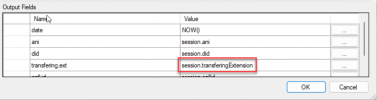
I have identified an issue with CFD in 3CX version 20 where it cannot send values from the parameters session.transferingExtension. Initially, I attempted to use the built-in component survey with the output fields parameter. I set the variable parameter to the table below.
1706079694881.png

You can review my call flow log here.

1706079852001.png
All parameters seem to be working fine, except for session.transferingExtension, which is not sending any values.
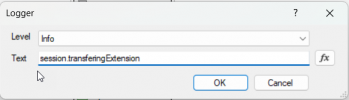
Subsequently, I attempted to debug by printing this parameter to the logging on my server, but it also proved unsuccessful.
1706079747883.png
 
This is something that we will be fixing in the next release of the CFD that we will be releasing soon. Meanwhile, in order to fix this, you can manually edit the C# script once you upload it to 3CX. You need to change this line:
variableMap["session.transferingExtension"] = new Variable(MyCall["onbehlfof"] ?? string.Empty);

To this:
variableMap["session.transferingExtension"] = new Variable(MyCall.ReferredByDN?.Number ?? string.Empty);
 
This is something that we will be fixing in the next release of the CFD that we will be releasing soon. Meanwhile, in order to fix this, you can manually edit the C# script once you upload it to 3CX. You need to change this line:
variableMap["session.transferingExtension"] = new Variable(MyCall["onbehlfof"] ?? string.Empty);

To this:
variableMap["session.transferingExtension"] = new Variable(MyCall.ReferredByDN?.Number ?? string.Empty);
Hi team,

That's work! thank you.
1706150267930.png

So, next update release, you will have Call flow designer for MacOS ?
 
So, next update release, you will have Call flow designer for MacOS ?
No, this is not in our roadmap. I just mentioned that this bug will be fixed in the next version of the CFD Tool for Windows.
 
  • Like
Reactions: Evolute IT
@edossantos, while here, as of v18, session.transferingExtension is not populated if call is transferred from a queue.
Will this be corrected with v20, will session.transferingExtension have the number of the transferring queue ?
Thank you very much !
 
@edossantos, while here, as of v18, session.transferingExtension is not populated if call is transferred from a queue.
Will this be corrected with v20, will session.transferingExtension have the number of the transferring queue ?
Thank you very much !
Yes, just made a quick test, and the queue extension number is there. You can get this behavior right now by editing the C# script as explained here.
 
@edossantos Is there an update for the ETA of the new CFD tool?
 
This is something that we will be fixing in the next release of the CFD that we will be releasing soon. Meanwhile, in order to fix this, you can manually edit the C# script once you upload it to 3CX. You need to change this line:
variableMap["session.transferingExtension"] = new Variable(MyCall["onbehlfof"] ?? string.Empty);

To this:
variableMap["session.transferingExtension"] = new Variable(MyCall.ReferredByDN?.Number ?? string.Empty);
Hello,

I tried this in the current newest 3CX v20 version but my CFD is still failing. I checked the Logs and can see, that the Variable is not filled with an value.
 
Hello,

I tried this in the current newest 3CX v20 version but my CFD is still failing. I checked the Logs and can see, that the Variable is not filled with an value.
That's weird, didn't you redeploy the ZIP file generated by the CFD? Check the C# code in the admin console.
 
That's weird, didn't you redeploy the ZIP file generated by the CFD? Check the C# code in the admin console.
Hello,

I tried it with changing the C#-Code in Admin console. Even after a restart the value ist not set. I was curious and deploy the script on a second 3CX V20 and Changed the code via Admin Console but still no value.
 
So your changes to the C# code in the admin console are not saved? That's weird! You should check for errors in the logs....
 
No the C#-Code is saved and the CFD is loading. But when I run the CFD and check the log, I can see that the Value is not present.
 
I'm experiencing a similar issue and i wonder if I might ask if anyone can spot something that I've done wrong.

One of our excellent techincal people has upgraded a V18 to a V20 Enterprise installation on one of our Windows test servers.

User 887 is one of the extensions we use for our IVRs and it has one DID number assigned.

In "Call Forwarding" all four of the "forward calls" options are set to "System Extension" and "My New IVR v20". Note that after the upgrade this was originally set to "External Number" which didn't work and i've manually changed this to be "System Extension". Choosing this value allowed me to choose the IVR script we need to call from a drop-down list.

I've used version 18.5.8.0 of the call flow designer to build our IVR and have uploaded and installed the built zip file. Incidently the radio group on the page to "Add Call Processing Script" is really difficult to see and had me wondering how to upload the zip file.

I've then edited the c# of the IVR directly and replaced the old "onbehlfof" assignment with the one for "ReferredByDN".
//variableMap["session.transferingExtension"] = new Variable(MyCall["onbehlfof"] ?? string.Empty);
variableMap["session.transferingExtension"] = new Variable(MyCall.ReferredByDN?.Number ?? string.Empty);

In 3CXCallFlow.log...

2024/06/03 16:07:30.202|2888|0106|Info|CallPair.CallFlowCore.BuiltIn.Router.Router.42.[C:14.3]-From script: Call routing from Wexternalline.54: 10001 on Wprovider.2: 193.164.252.25:5060 - OurProviderName UAT(<MyPhoneNumber>) on behalf of Wdn.82: 887 is Succeeded with forwarding:
ProceedWithNoExceptions.Wextension.82: 887.
Extension.Wroutepoint.103: my_new_ivr_3cx20_v1.ivr_common.
lastrouting result Success(NotSpecified:Success):

2024/06/03 16:07:30.308|2888|0106|Erro|CallPair.my_new_ivr_3cx20_v1.ivr_common_19.ivr_common.43.[C:14.4]-From script: my_new_ivr_3cx20_v1 - CallID 8c8b5a0f270c0000_14 - CallFlow.CFD.LoggerComponent 'log_call_details' - IVR : transferingExtension[] ani[<MyPhoneNumber>] callid[8c8b5a0f270c0000_14] did[<ExternalNumber>] dnis[my_new_ivr_3cx20_v1.ivr_common]

With v18 the transferingExtension[] in the log row above would contain 887 but in v20 it's unfortunately blank. Our IVR script needs the extension number and so the call fails.
 
My problem is absolutely the same.
 
This may got broken with V20U1. Did someone find a solution for this?
 
You might want to dump the properties attached to the call from a C# script, so you can understand from which property you can get this value.
 
I tried nearly everything in "MyCall", there are some points where this information should be, but the routing process seems to soak the information before it gets into the call flow.
From the debug log i can the that "CallPair.CallFlowCore.BuiltIn.Router.Router" knows the behalf of number. After that its gone
 
  • Like
Reactions: Evolute IT
I tried nearly everything in "MyCall", there are some points where this information should be, but the routing process seems to soak the information before it gets into the call flow.
From the debug log i can the that "CallPair.CallFlowCore.BuiltIn.Router.Router" knows the behalf of number. After that its gone
I made a test here, adding the following C# code to the generated script:
C#:
            foreach (var entry in MyCall.AttachedData)
            {
                logFormatter.Trace("Attached Data: '" + entry.Key + "'=" + entry.Value);
            }
            
            foreach (var entry in MyCall.Caller.AttachedData)
            {
                logFormatter.Trace("Caller Attached Data: '" + entry.Key + "'=" + entry.Value);
            }

Then, I can see that in my test the number of the extension transferring the call is in the following variable:
MyCall.Caller["extnumber"]

So maybe the following could work:
variableMap["session.transferingExtension"] = new Variable(MyCall.Caller["extnumber"] ?? string.Empty);
 
On V20U2 this looks good. Thanks @edossantos_sipcaller !!

Hope this will be fixed soon in the designer aswell
 
Status
Not open for further replies.

Forum statistics

Threads
111,973
Messages
590,071
Members
164,892
Latest member
Phone1stStop
