CH - Swisscom SIP Trunk Registration

cb83

Customer
Joined
Jul 12, 2024
Messages
23
Reaction score
0
Posting here as Swisscom refuse to provide ANY tech support for any PBX not supplied by them.

The guides on the 3CX KB do not match the details that I have been supplied with by Swisscom ( private details in [ ] )

These verified details are as follows:

Your number: +41[NUMBER]
Authentication name: [USER]@swisscom.ch

Domain: voip.swisscom.ch

Outbound Proxy: fs1.voip.swisscom.ch

Password:[PASSWORD]

I have created a Generic SIP Trunk in 3CX and filled in the fields as follows:

Main Trunk Number : +41[NUMBER]
Authentication ID (SIP User ID) : [USER]@swisscom.ch
Authentication password : [PASSWORD]
Optional 3-way authentication ID : BLANK (also tried [PASSWORD])
Type of authentication : Register / Account based (also tried IP Based)
Registrar/Server : voip.swisscom.ch 5060
Outbound Proxy : fs1.voip.swisscom.ch 5060

Log returns :

Call or Registration to Swisscom +41[NUMBER] has failed. sip:[email protected]:5060 replied: 500 Cx Unable To Comply 110200201005004; from IP:138.188.110.4:5060

Firewall is fine. Other SIP Trunks (Sipgate) and SBC / Bridges are working fine.

Can anybody provide any input regarding their experience with Swisscom?
 
What Swisscom product are you using?
 
"beem Office"
 
For clarity, are you unable to REGISTER the trunk? Or are you unable to make calls on the trunk?
 
After a quick Internet search the Beem office bundle usually comes with a Smart Business Connect or an Enterprise SIP trunk. Do you know which one you are using?
 
For clarity, are you unable to REGISTER the trunk? Or are you unable to make calls on the trunk?
I have tried both both types of authentication.

When using Register/Account based, it returns the error as per the post:

Call or Registration to Swisscom +41[NUMBER] has failed. sip:[email protected]:5060 replied: 500 Cx Unable To Comply 110200201005004; from IP:138.188.110.4:5060

If I change to IP based, it looks like it is registered but I doubt it is. This is because i can change the Main Trunk Number and / or SIP User ID to any junk and it still shows green in 3CX.
 
If I change to IP based, it looks like it is registered but I doubt it is. This is because i can change the Main Trunk Number and / or SIP User ID to any junk and it still shows green in 3CX.

Did you try making and receiving calls in this mode? As it is IP based registration, the value of the main trunk number is not exchanged/relevant to the registration process.
 
Did you try making and receiving calls in this mode? As it is IP based registration, the value of the main trunk number is not exchanged/relevant to the registration process.
Yes I tried to make calls:

Call or Registration to [SWISS NUMBER]@(Ln.10001@Swisscom +41[TRUNK NUMBER]) has failed. sip:138.188.110.4:5060;lr replied: Forbidden (403)
 
After a quick Internet search the Beem office bundle usually comes with a Smart Business Connect or an Enterprise SIP trunk. Do you know which one you are using?
Impossible to tell!!

They are unbelievably difficult to deal with!

It's a chicken and egg situation as when you speak to their support, they say there is no support available for SIP. All they will say is that we have SIP trunk support and that the credentials can be found in the account portal. I got the credentials from the portal.
 
You are probably under the Swisscom Smart Business Connect product however what we support is the case where you connect locally to an eSBC or your router in your case but the proxy you have actually resolves to a public IP for us. Maybe internally for you that is not the case however.
I would use the Smart Business Connect template from the drop down menu and see if that helps.

Also for Authentication name "Authentication name: [USER]@swisscom.ch
" just use the [USER] part and not the entire "Authentication name: [USER]@swisscom.ch
".
 
You are probably under the Swisscom Smart Business Connect product however what we support is the case where you connect locally to an eSBC or your router in your case but the proxy you have actually resolves to a public IP for us. Maybe internally for you that is not the case however.
I would use the Smart Business Connect template from the drop down menu and see if that helps.

Also for Authentication name "Authentication name: [USER]@swisscom.ch
" just use the [USER] part and not the entire "Authentication name: [USER]@swisscom.ch
".
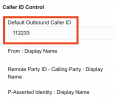
I did try using the Smart Business Connect template but there is a mandatory Default Outbound Caller ID field according to the guide. Unfortunately the Swisscom client account portal does not provide this. Of course, when I call them and ask for it they just say they don't support third party systems.
 
I did try using the Smart Business Connect template but there is a mandatory Default Outbound Caller ID field according to the guide. Unfortunately the Swisscom client account portal does not provide this. Of course, when I call them and ask for it they just say they don't support third party systems.

It looks like you are referring to the Smart Business Connect INTERNET guide which is different as it purely TLS. We do not have a guide for the Smart Business Connect because configuration is network dependent.
There is no need for a customer code being added to the Default Outbound Caller ID field.
 
It looks like you are referring to the Smart Business Connect INTERNET guide which is different as it purely TLS. We do not have a guide for the Smart Business Connect because configuration is network dependent.
There is no need for a customer code being added to the Default Outbound Caller ID field.
I have tried both profiles.

Result is always the same

Call or Registration to Swisscom +41[NUMBER] has failed. sip:[email protected]:5060 replied: 500 Cx Unable To Comply 110200201005004; from IP:138.188.110.4:5060
 
Short of anybody from Swisscom or at least somebody with experience of using their trunks showing up here, I think I'll have to abandon it and use Sipgate.

Regardless of whether others have actually got it working, I think it would be worth removing Swisscom from the list of approved SIP trunks as they will not provide any support for third party systems.
 
Regardless of whether others have actually got it working, I think it would be worth removing Swisscom from the list of approved SIP trunks as they will not provide any support for third party systems.
Not sure what their support policy is but we work closely with Swisscom to verify these trunks yearly so they are up to date. We will look into it though.
Regarding your issue, you seem to be using a different version of the trunk we support so not sure we can offer much assistance.
 
Your Swisscom account should have a 6-digit customer ID. This 6-digit customer id should be inserted here:
1770208906559.png

Have you checked this?
 
Not sure what their support policy is but we work closely with Swisscom to verify these trunks yearly so they are up to date. We will look into it though.
Regarding your issue, you seem to be using a different version of the trunk we support so not sure we can offer much assistance.
Thanks.

I'd like to know who you are talking to as they take a hard line about no third party support.

There is not mention of 3CX on their website.

Perhaps they are operating a closed shop?
 

Latest Posts

Forum statistics

Threads
111,990
Messages
590,161
Members
164,926
Latest member
tohoken1