Change CallerName from CFD

Status
Not open for further replies.

ypapouin

Free User
Joined
Sep 13, 2019
Messages
11
Reaction score
0
Hello @edossantos

In some old posts, I can read that it was not possible to do this using CFD.
But I found a blog post from 2019 (https://www.3cx.com/blog/releases/designing-call-flows-v16/) with a screenshot where you can read :

Change the Caller Name from the Callflow. For example, the caller enters a Customer ID, the Customer Name is retrieved from a database, and the Callflow transfers the call to a queue, changing the caller name to the value returned by the database.
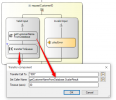
1632301198320.png

But If I add the "Transfer" component in latest CFD for v16, there is no such "Set Caller Name" option.
Has it been deleted ?

If this is a C# only method, can you provide us a snippet ?
 
Hello @edossantos

In some old posts, I can read that it was not possible to do this using CFD.
But I found a blog post from 2019 (https://www.3cx.com/blog/releases/designing-call-flows-v16/) with a screenshot where you can read :

Change the Caller Name from the Callflow. For example, the caller enters a Customer ID, the Customer Name is retrieved from a database, and the Callflow transfers the call to a queue, changing the caller name to the value returned by the database.

View attachment 24605

But If I add the "Transfer" component in latest CFD for v16, there is no such "Set Caller Name" option.
Has it been deleted ?

If this is a C# only method, can you provide us a snippet ?
That feature was never implemented in the Transfer component. That was a prototype in which we were working at that time, and the article was describing features that we were expecting to implement, however that particular feature was not implemented.

There is a way in which you can do this, and change the caller's name shown in the Web Client. Please check this:
https://www.3cx.com/community/threads/how-to-display-contact-name-from-mssql-database.82206/
 
  • Like
Reactions: Evolute IT
Thank you but using "public_lookup_displayname_override" was not a solution as it is a Webclient's only solution.

I found a way using your built-in API and the 3CX phonebook is correctly updated but the FirstName and LastName fields are not re-read from database for the current call (whereas the company field is). I need to have a second call to show valid phonebook data.

Is there a way to force a refresh ?

C#:
        PhoneSystem ps = PhoneSystem.Root;
        Tenant tn = ps.GetTenant();
        PhoneBookEntry pbe = null;

        foreach (PhoneBookEntry res in tn.FindContacts(phonenumber))
        {
            if (res.Tag == tag) {
                pbe = res;
                break;
            }
        }

        if (pbe == null) {
            pbe = tn.CreatePhoneBookEntry();
            pbe.Tag = tag;
        }

        // Update Entry Data
        pbe.FirstName = firstname;
        pbe.LastName = lastname;
        pbe.PhoneNumber = phonenumber;
        pbe.CompanyName = company;

        pbe.AddressNumberOrData0 = pv_an0;
        pbe.AddressNumberOrData1 = pv_an1;
        pbe.AddressNumberOrData2 = pv_an2;
        pbe.AddressNumberOrData3 = pv_an3;
        pbe.AddressNumberOrData4 = pv_an4;
        pbe.AddressNumberOrData5 = pv_an5;
        pbe.AddressNumberOrData6 = pv_an6;
        pbe.AddressNumberOrData7 = pv_an7;
        pbe.AddressNumberOrData8 = pv_an8;
        pbe.AddressNumberOrData9 = pv_an9;

        // Save changes
        pbe.Save();

        return true;
 
Thank you but using "public_lookup_displayname_override" was not a solution as it is a Webclient's only solution.

I found a way using your built-in API and the 3CX phonebook is correctly updated but the FirstName and LastName fields are not re-read from database for the current call (whereas the company field is). I need to have a second call to show valid phonebook data.

Is there a way to force a refresh ?

C#:
        PhoneSystem ps = PhoneSystem.Root;
        Tenant tn = ps.GetTenant();
        PhoneBookEntry pbe = null;

        foreach (PhoneBookEntry res in tn.FindContacts(phonenumber))
        {
            if (res.Tag == tag) {
                pbe = res;
                break;
            }
        }

        if (pbe == null) {
            pbe = tn.CreatePhoneBookEntry();
            pbe.Tag = tag;
        }

        // Update Entry Data
        pbe.FirstName = firstname;
        pbe.LastName = lastname;
        pbe.PhoneNumber = phonenumber;
        pbe.CompanyName = company;

        pbe.AddressNumberOrData0 = pv_an0;
        pbe.AddressNumberOrData1 = pv_an1;
        pbe.AddressNumberOrData2 = pv_an2;
        pbe.AddressNumberOrData3 = pv_an3;
        pbe.AddressNumberOrData4 = pv_an4;
        pbe.AddressNumberOrData5 = pv_an5;
        pbe.AddressNumberOrData6 = pv_an6;
        pbe.AddressNumberOrData7 = pv_an7;
        pbe.AddressNumberOrData8 = pv_an8;
        pbe.AddressNumberOrData9 = pv_an9;

        // Save changes
        pbe.Save();

        return true;
Not from what we know.
 
Is there a way to force a refresh ?
No, there isn't. The information from the global phonebook is added to the call when the call is received by 3CX. This can't be updated later.
 
  • Like
Reactions: Evolute IT
Status
Not open for further replies.

Forum statistics

Threads
112,277
Messages
591,647
Members
165,396
Latest member
amazingbv