Change SMTP settings after upgrading to V20 from V18

Cliffstone

Free User
Joined
Jun 11, 2025
Messages
3
Reaction score
0
My 3CX instance was original setup using V18 and under that version one could set the system to use their own SMTP server. And that is what I did. Works great. And my settings survived the in-place upgrade to v20. However, I am now in the process of migrating to a different email host and need to update my SMTP settings. It seems that 3CX decided to remove the access to SMTP settings for non-Pro licensed systems and forces you to use their servers for email. Well that's fine and dandy and all but it's still pointing at my custom smtp provider I setup years ago. How do I update it? If I cannot change the custom smtp settings, how do I set it to use the 3CX server?
 
Can you please create a case to the Customer Care Team from the below contact form to clarify further?
https://www.3cx.com/contact/
 
He is using the free 3cx from v18 and cant change the email settings to custom or back to 3cx. Thats his problem.
 
My 3CX instance was original setup using V18 and under that version one could set the system to use their own SMTP server. And that is what I did. Works great. And my settings survived the in-place upgrade to v20. However, I am now in the process of migrating to a different email host and need to update my SMTP settings. It seems that 3CX decided to remove the access to SMTP settings for non-Pro licensed systems and forces you to use their servers for email. Well that's fine and dandy and all but it's still pointing at my custom smtp provider I setup years ago. How do I update it? If I cannot change the custom smtp settings, how do I set it to use the 3CX server?
You can try to modify your backup and restore it to use 3cx smtp.
 
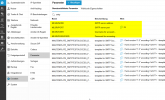
I checked my own pbx, you will find the stuff under parameter in your pbx and can change it there.
1749634363580.png
also change the parameter MLFROMADDR to empty
 
I checked my own pbx, you will find the stuff under parameter in your pbx and can change it there.
View attachment 48214
also change the parameter MLFROMADDR to empty


Thanks for the tips. But I do not have access to the "Parameter" section. This may be because I am in the "System Owner" role perhaps?

1749648233969.png
 
Hi Cliffstone

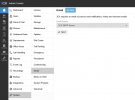
Please use the menu option 'Advanced', there you will find 'Parameters'.
Check with the answer of bitn2

Paulo
 
  • Like
Reactions: bitn2
Thanks for the tips. But I do not have access to the "Parameter" section. This may be because I am in the "System Owner" role perhaps?

View attachment 48217


Ah yes. Too early in the morning after a sleepless night. I made the changes and restarted the server. But it still sends through 3cx.net. So I guess they have coded it to ignore these settings on a free / personal license. Ugh. To me that seems like a pointless thing for them to do.

1749652131486.png
 
Ah yes. Too early in the morning after a sleepless night. I made the changes and restarted the server. But it still sends through 3cx.net. So I guess they have coded it to ignore these settings on a free / personal license. Ugh. To me that seems like a pointless thing for them to do.

View attachment 48218
That's what you want in your post... You cant use your own smtp.
 

Members Online Now

Forum statistics

Threads
111,832
Messages
589,286
Members
164,662
Latest member
DejanMDS