Change voice prompt for out of hours

Status
Not open for further replies.

Luke Ivison

Customer
Joined
Jun 4, 2018
Messages
56
Reaction score
1
Hi

We have our inboud rules configured with office hours, however when its outside office hours we get the message "end destination cannot be reached contact administrator change". Is there a way that this prompt can be changed at all as when a customer phones it looks a bit unprofessional?

Thanks
 
What is the route of out of hours for the inbound rule.

How do you want to handle out of hours calls ?
 
I would like it to go to message which states our opening hours and advises the customer call back then. We don't want a voicemail, just a message.
 
what is your actual call flow?

is there a unique number directly forwarded to operator ? is it something else most sophisticated?
 
Do you use Queues? Ring Groups? DIDs ? Trunk sip? else?

Please give us some more details on what you do now and what you want to achieve.
 
The phone call comes in, gets connected to a digial receptionist with an IVR and then they press a number to connect to a queue.
 
do you need to use breaks or only OOH ?
 
we would only need it for out of hours when we are closed
 
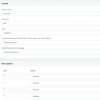
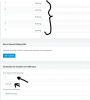
Can you screen copy your inbound rule (mask sensitive infos)
and where have you set hours
 
If you want just to manage 2 statuses "Available" and " DND" then just add a new IVR with no choice, set yhis IVR in your inbound rule instead of "end call" setting.

Record your message and add it in this new IVR , done.
 
11939
11940

Wav file can be recorded from a phone, after record is done or file sended to PBX select it for use in IVR created, don't forget validate OK
 
  • Like
Reactions: Saqqara
As per post from awsp2, you need to create a digital receptionist and point out of office hours to this digital receptionist
 
Hi Luke,

Looks like you had "End Call" as your destination for out of office hours.

But you say you heard the message DISABLED_FWD which might imply your call flow is trying to dial to a blocked destination.

You might also have the General option "Automatically disable Outbound calls on all Ports outside Office hours" enabled on your system which blocks any calls that leave your trunk.

With the above in mind, you might want to see the exact flow or if someone is trying to connect to an option that lets them dial "out through your trunk"
 
Status
Not open for further replies.

Forum statistics

Threads
111,933
Messages
589,810
Members
164,808
Latest member
jsbjsb