Change "WordPress" name for offline messages and transcripts emails

Status
Not open for further replies.

Pepois

New User
Joined
Apr 8, 2022
Messages
6
Reaction score
0
Hi there again, where can I change the "WordPress" name and also the sending email instead of wordpress@(your domain) to: my_company@(my domain) for offline messages and chat transcripts?
I am sure everyone would appreciate hiding WordPress from any email going to our customers etc.

The closest I got was taking a peek at your offline_messages_helper.php file and look for the 'wplc-email-address' entry.

Thank you

Tony Septien

pd. I was also really hoping you could point me to where I could change the offline/automatic responses delay time etc.
 
Hi @Pepois,

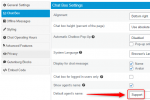
Can you show me a screenshot of what you mean by the Wordpress name?

You can change the name of the default support agent here:

1651225669144.png
 
Hello there VasilisV,

Thank you for taking the time to reply to me!

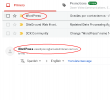
I am referring to the outgoing email address and name:

1.png

I was checking your code and found out that you guys actually had this option before in your Pro version?:

if (isset($wplc_settings->wplc_pro_chat_email_address)) {
$email_address = $wplc_settings->wplc_pro_chat_email_address;
} else {
$email_address = get_option('admin_email');

So its setup as a get_option.

Obvioulsy it is VERY annoying to have offline msgs or transcripts sent to client with the Wordpress name and email name (admin_email)

If one of the developers could take a look at this, I am sure, they could either implement this option in the LiveChat admin GUI.

Thank you!
Tony Septien
 

Attachments

  • 1.png
    1.png
    14.3 KB · Views: 2
Hi @Pepois,

Do you have any other SMTP plugin / mail plugin installed? As far as I'm aware we don't have any settings that control this within the 3CX Wordpress Live Chat plugin.
 
It's hardcoded in your code.
 
Hi, just for anyone who might be having the same issue, I found the solution, just adding a filter for both Offline Messages and Notifications functions inside folder: includes/helpers/offline_messages_helper.php:

public static function send_offline_message_autorespond( $wplc_user_name,$wplc_user_email ) {
....
add_filter( 'wp_mail_from', function( $email ) {
return '[email protected]';
} );

add_filter( 'wp_mail_from_name', function( $name ) {
return 'your-company-name';
} );

/* and then...*/

public static function send_offline_notification_mail( $wplc_user_name,$wplc_user_email,$wplc_user_phone,$wplc_offline_message ) {
...

add_filter( 'wp_mail_from', function( $email ) {
return '[email protected]';
} );

add_filter( 'wp_mail_from_name', function( $name ) {
return 'your-company-name';
} );

*Edit:

Same thing for the Transcripts: inside folder: includes/helpers/transcripts_helper.php:


public static function wplc_send_transcript( $cid ) {
....
add_filter( 'wp_mail_from', function( $email ) {
return '[email protected]';
} );

add_filter( 'wp_mail_from_name', function( $name ) {
return 'your-company-name';
} );

Cheers!
 
Last edited:
Status
Not open for further replies.

Forum statistics

Threads
112,149
Messages
590,965
Members
165,170
Latest member
SupportRock