Solved Changing Default Operator Extension

Status
Not open for further replies.

veiliant

Bronze Partner
Basic Certified
Joined
Aug 21, 2015
Messages
41
Reaction score
1
Is there a way to change the operator extension in V16?

I've looked at the old posts that change it in Settings - PBX Settings, but there is no PBX settings?

I've tried changing in in Parameters, changing the value to 100, but it did not update.

Any help is appreciated.

Thanks
 
Hi @veiliant

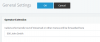
Go to Dashboard > Settings > General

1597758109575.png
 
  • Like
Reactions: GrabberBlue
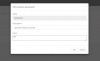
Settings --> General Settings

1597758113002.png
 
Yes but how do i change the extension number, its set to 500 now, i want to set it to 100?

Doesn't let you change the extension
 
What do you mean exactly? Can you describe in more details the steps, and the results?
 
I'm trying to change the Operator extension from 500 to 100

There is no where to change it, the top menu in General, is just a drop down, there is no option to change the actual extension number from 500 to 100

1597758730089.png
 
I can on mine. Perhaps you are logged in as a user with insufficient permissions?
 
Do other extensions exist on your PBX, and most importantly are you logging in the management console as the Global Administrator or just as an extension with admin rights?
 
You can not rename extensions numbers within 3CX, does extension 100 exist ?

If not then you have to

You have to delete the current assigned phone under provisioning for extension 500.
Add new extension 100
Factory default the phone, and assign it to extension 100
Change the operator extension with above instructions
 
Yes i'm logged in as Global Administrator, its a new PBX, there's only 1 user.

I don't think you guys understand what i'm trying to do, i want to change the DEFAULT Operator Extension from 500 to 100. the Actual extension. Not changing it to another extension, i can do that.

1597759430587.png

I've tried to change it here from 500 to 100, but it did not work
 
I see, so regardless of the operator, you simply want to change the number of extension 500 to 100.

In this case, create a new extension with the number 100, and then go change the setting to point to extension 100. You can then delete 500 altogether.

Note that you cannot change the internal number of extensions (any extension including the operator). You must delete and recreate them (or use the Copy function)
 
Ahh ok, thank you! i deleted and recreated, it worked

I read you the operator couldn't be deleted so i was trying to change it.

Thanks.
 
Glad to help!
 
Status
Not open for further replies.

Forum statistics

Threads
111,956
Messages
589,927
Members
164,858
Latest member
MichaelRussell3