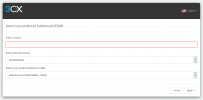
Can someone point me in the right direction on using my own FQDN? I already have my SSL certs and DNS configured for it, but the v16 installer forces a 3CX subdomain.
Probably wouldn't hurt to ask the partner you bought your license from as I don't see that price for any listed versions but I'm looking at the latest price list so it may be before they lowered the price a little bit back.
Sounds like you bought a standard license that gives more simultaneous calls and not pro.
under the email address you are using to log in to the forum I see 2 subscriptions.
One is a 15 Standard Perpetual one which corresponds to your price stated, which appears also not to be used at the moment. This one cannot have custom FQDNs.
You also have a 4 PRO Annual Subscription which got upgraded today by your partner.
This one can have customer FQDNs.
But may I ask why you like to take on the hassle to run on a customer FQDN?
I had the perpetual license prior to yesterday (which I would have preferred to keep), but since it was only Standard, I had to switch off it to get the custom FQDNs and ability to use my own SMTP server.
As for why I need this, I already have to maintain certificates for other uses. But most importantly, my company minimizes external dependencies as much as possible.