• We do not provide troubleshooting help for unsupported phones. Please try with a supported phone.
  • V20 Update 10 Alpha 2 Learn more

Changing Name on a phone extension reverts back after a day

Status
Not open for further replies.

BGUPTILL

Customer
Joined
Dec 15, 2021
Messages
1
Reaction score
1
Lets say someone leaves the company and a new person starts... I go to change the name that displays on their phone extension and it will save for a day or two and then revert back to the previous name. Sometimes I have to do this 2 or 3 times before the name change sticks. Any idea why this might be happening?
 
  • Like
Reactions: ESQ_IT
You are changing the name, where? In the 3CX extension settings? Was the set "factory Reset", before the user was changed? Was there ever a second device involved? I'm wondering if the old name was put there, at some point, and changing when the set is re-provisioned. It would certainly make sence that the name would be what is put in the PBX, but I've seen stranger things happen.
 
  • Like
Reactions: JohnS_3CX
It really depends on

a) where exactly are you making the change

b) what kind of phone / firmware / pbx version is this running on?
 
  • Like
Reactions: Evolute IT
Same issue here. Management Console > Users > Edit then change the first and last name of a user and save. The changes show up on the list of users but after a random period of time it reverts back to the original name.
 
seeing names revert is usually one of two things:

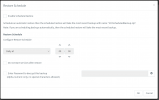
a) you have restore schedule enabled
1652092740422.png

or

b) you have a second 3CX system running somewhere and whenever it auto-updates its DNS records, your phones end up getting provisioned from your second system and you end up seeing the names revert
 
@JohnS_3CX

Hi John;

We have recently been having these issues as well within our environment. I have only had it happen on two occasions under my watch (albeit multiple times for those phones/users), the most recent was last week.

I have checked our settings and we do not have 'Enable Schedule Restore' checked. We also only have one 3CX system running. We are currently running version 18.0 (Build 461). The affected phone is Yealink's T42G running the latest FW of 29.83.0.130.

In our latest occurrence of this it may have actually been caused by the Microsoft 365 Sync. I have changed the extension again, and ensured the O365 profile was updated as well. We will wait to see if the extension changes stick this time.

Thanks;
Jared
 
Last edited:
  • Like
Reactions: JohnS_3CX
Yes Jared, thanks for pointing that out - you are absolutely correct.

So for anyone reading this in the future check the following:

a) do you have a restore schedule enabled?

b) are you sure you don't have a 2nd 3CX system running?

c) Have you enabled Microsoft 365 user sync?
 
  • Like
Reactions: ESQ_IT
^ if the issue is c) for your environment, it is good to ensure that you double-check the 'Outbound caller ID' field within the extension that is being problematic.

For our most recent event, the extension got reverted to the previous person's details and the 'Outbound caller ID' got changed to that person's new phone number. This resulted in the extension number not matching the caller ID, and I believe it also made it so the extension reverted again based on the caller ID field.

I will update once more if the extension reverts again; at this point there appears to be nothing that would tie back to the old user.
 
  • Like
Reactions: JohnS_3CX
Thanks for the information. I have disabled both my fail-over instance and its restore settings which didn't work but I am syncing with MS 365 so will have a closer look at that and will report back. Thanks.
 
  • Like
Reactions: JohnS_3CX
^ if the issue is c) for your environment, it is good to ensure that you double-check the 'Outbound caller ID' field within the extension that is being problematic.

For our most recent event, the extension got reverted to the previous person's details and the 'Outbound caller ID' got changed to that person's new phone number. This resulted in the extension number not matching the caller ID, and I believe it also made it so the extension reverted again based on the caller ID field.

I will update once more if the extension reverts again; at this point there appears to be nothing that would tie back to the old user.
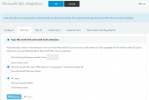
1652259372629.png

This is an option you can control
 
FYI just keep in mind this affects all extensions you sync
 
  • Like
Reactions: jonfry
Ours reverted once again. At this point, I will go to our normal method of fixing which usually involves a factory reset of the phone and then assigning the extension again. I am not sure what has caused it to revert this time...
 
Ignore the phone, has the actual extension in 3CX changed name?
 
@JohnS_3CX Yes, the extension itself changes names. It also changes the email and the caller ID.

I was able to determine that it is definitely related to the 365 sync in our situation:
- Extension XX shows 'Synced with Microsoft 365'
- I remove the previous user for that extension from the list of 365 synced members
- I set the new details onto the extension XX: First/Last name, email, and outbound caller ID - all set properly
- If I turn Sync back on for the previous user, then extension XX reverts all details except for the caller ID (the caller ID number updates to the previous-persons new number)
- Both extension XX and YY are then under the name of the initial user and the new user is no where to be found

I have confirmed that AD details are completely up-to-date with no references to the previous number. I also checked Azure to ensure these changes are reflected, which they are. Somehow our 3CX system still has ties to the old extension despite having updated all phone related details within AD and in 3CX.

For now, I have removed the affected user from the 365 sync services since factory resetting the phone did not help.
 
Last edited:
It's an MS 365 issue for me too. I've also disabled sync for now.
 
You can try the following which should solve this

1. Disable user sync in 3CX
2. Delete the extension in 3CX
3. Create a new extension is 3CX (using same ext. number if you wish)
4. Give it a new random name, but use the correct email address you wish to sync from M365
5. Now enable user sync again and you should finally see the extension pickup the correct name and details from M365 and stay that way
 
Status
Not open for further replies.

Forum statistics

Threads
112,148
Messages
590,963
Members
165,169
Latest member
Isaac415