Changing the name on a license

Bluewire

Silver Partner
Joined
Jan 27, 2020
Messages
3
Reaction score
0
I'm trying to change the owner name and FQDN for an existing license key that never was installed because the customer decided he did not want the service. I've been searching for an answer as to where to change the name to a new customer. I got a recommended solution to change the name and it says go to the Admin Console. I'm not sure where the Admin Console is. Is this in 3CX? If so, how do I get to that. I'm inserting the image of the instructions that I found.
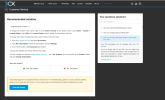
1793731097279.png
 
Hi, since your system isn't installed, you don't have an FQDN linked to the subscription. The subscription is linked to your account and email. When you install it, choose a new FQDN for it, and once it's installed, you can change the subscription owner's email in the system.
 
  • Like
Reactions: Evolute IT
Thanks for your response. I've never done this so, my question is: do I just assign a FQDN based on the owner's name and should I do this first in the 3CX Portal?
 
You can assign the fqdn to the system during installation or through the portal, whichever you prefer. The fqdn you assign is up to you, and you can use the customer's company name and set it to use a 3cx fqdn if this will be hosted with 3cx or self-managed.
 
Hello, whenever I installed the license....it didn't allow me to set the FQDN, it was on automatic for about 8:30 minutes and now that it is installed I can't change it. This is in the 3CX portal.
 
Last edited by a moderator:
Hello, whenever I installed the license....it didn't allow me to set the FQDN, it was on automatic for about 8:30 minutes and now that it is installed I can't change it. This is in the 3CX portal.
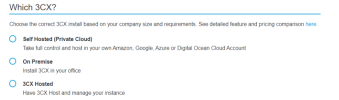
Hi @Bluewire you have to access the user portal with the email registered on the subscription ----> click on My Systems ----> select the subscription and click on Install ----> You may install it self-hosted, on premise or with Hosted by 3CX if you have a valid hosting subscription.

1793794163643.png

During this wizard setup you can set the pbx FQDN, just please read and follow the installation manual ---> https://www.3cx.com/docs/manual/install/

The FQDN is set during this setup, after the pbx is installed then you can not change it. You would need to delete the current machine, access the user portal and disconnect the current fqdn, then repeat the process.
 

Latest Posts

Forum statistics

Threads
112,408
Messages
592,377
Members
165,591
Latest member
WCS2026