Chat notifications

Status
Not open for further replies.

UnConundrum2

Customer
Joined
Apr 14, 2019
Messages
13
Reaction score
2
Many of my users are using the web client. We frequently use chat for messages between users. Unfortunately, when a new chat is started, the recipient doesn't receive a notification if they're on a different tab. We have "Show Chat Toaster and Web Notifications" and the check box for "Play chat notifications" checked. I would expect the notification to appear and the sound to be played regardless of the tab the browser is on (yes, the 3cx page is open in another tab). Am I missing a setting somewhere?

BTW, most of our computers are macs and we have all options checked in the notifications preference pane.
 
Many of my users are using the web client. We frequently use chat for messages between users. Unfortunately, when a new chat is started, the recipient doesn't receive a notification if they're on a different tab. We have "Show Chat Toaster and Web Notifications" and the check box for "Play chat notifications" checked. I would expect the notification to appear and the sound to be played regardless of the tab the browser is on (yes, the 3cx page is open in another tab). Am I missing a setting somewhere?

BTW, most of our computers are macs and we have all options checked in the notifications preference pane.
Are you using Chrome or Safari? You should hear the notification sound at least.
 
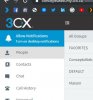
Make sure the audio isn't muted for that page and that the permission for desktop notifications is allowed. It should be a blue bar in the top left sidebar.
 
Make sure the audio isn't muted for that page and that the permission for desktop notifications is allowed. It should be a blue bar in the top left sidebar.
Right clicking on the tab for the 3CX web client offers the option to mute the tab. If I select that, the tab then offers the option to unmute the tab. I have verified that the option is to mute the tab, meaning that it is not muted.

In the Notifications pane of System Preferences, all 5 options are selected and the 3CXPhone alert style is "Alerts."

I do not see a blue bar in the left sidebar, or anywhere else for that matter.
 
In the Notifications pane of System Preferences, all 5 options are selected and the 3CXPhone alert style is "Alerts."
The settings for the Webclient won't be found in the macOS preferences. This is a Chrome matter.

I do not see a blue bar in the left sidebar, or anywhere else for that matter.
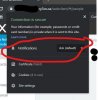
Normally, when you open the page for the first time on Chrome, you should see this blue popup:
11880

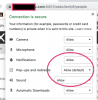
If not, make sure you have at least enabled notifications for that website here:
11881
 
Try setting it to Ask, then refresh to see if the blue bar appears.
 
Yes, the blue bar appeared after I set it to ask and reopened the page.
 
  • Like
Reactions: Evolute IT
Just to clarify, I receive the notifications, sounds, etc IF the 3cx tab has the focus. I receive no notification at all if another tab is active.
 
Just to clarify, I receive the notifications, sounds, etc IF the 3cx tab has the focus. I receive no notification at all if another tab is active.
I would check with 3CX staff that this is intented or not. I don't use the chat but I get my notifications for calls and voicemails tho.
 
Status
Not open for further replies.

Forum statistics

Threads
111,864
Messages
589,460
Members
164,704
Latest member
cdl1