Solved Chat - Talk Wordpress Plugin is not working

Status
Not open for further replies.

markf100

Free User
Joined
Jun 11, 2017
Messages
27
Reaction score
4
The latest update 9.4.0 for Wordpress is not functioning correctly - it remains offline.
I have had this plugin installed for over a year without issue and since the latest update - which is fantastic with the added ability for voice! I have been unable to use.

1) The 3CX host is set up correctly - tested directly to a URL.
2) The plugin is set up the same but I have seen mention of the capability to set office hours, which have not been checked so there must be something else that has changed and needs to be set.

Would appreciate any feedback as to how to fix.

Thank you.
 
Hi @markf100,

Can you clarify, when you say it remains offline, do you mean it exists but receives only offline chats or that the Live Chat icon is greyed out, or do you mean it doesn't exist?

Is your Wordpress time synced to your location correctly?
 
@markf100 can you please send me a PM message to give it a check on your website ?

Currently there is a problem that we are working on to fix which is related to the setup operating hours.
 
Thank you for the feedback.

I have worked through all the suggested fixes to do with "operating Hours" including syncing to my location but these have been ineffective. The icon is greyed out at all times so difficult to know what combination of checkboxes will make a difference.

The configuration/settings are straightforward generally but it would have been nice to have a checklist that compared the last version to this one with the changes that might affect the operation of the plugin.

I am sure you will get it sorted, the functionality is brilliant, would like to see the ability for an agent in chat have the capability to "offer voice" instead of the default currently available.
 
Hi @markf100,
I am sure you will get it sorted, the functionality is brilliant, would like to see the ability for an agent in chat have the capability to "offer voice" instead of the default currently available.
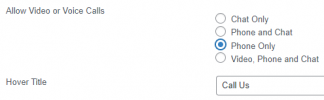
If you select the Phone only option, it will allow calling in as the default option.

1634282272106.png

This will show as LiveChat when the agent(s) receive a call.

1634282374726.png
 
Thank you for the feedback.

I have worked through all the suggested fixes to do with "operating Hours" including syncing to my location but these have been ineffective. The icon is greyed out at all times so difficult to know what combination of checkboxes will make a difference.

The configuration/settings are straightforward generally but it would have been nice to have a checklist that compared the last version to this one with the changes that might affect the operation of the plugin.

I am sure you will get it sorted, the functionality is brilliant, would like to see the ability for an agent in chat have the capability to "offer voice" instead of the default currently available.
Hello @markf100 ,

I will get in touch with you via Personal Message to get it one step further.

Thank you.
 
As per the previous suggestions I used the 3CX settings to determine when chat operates and removed all the restrictions from the wordpress plugin. But now the chat is open even when the global 3CX hours are closed. I have to set hours in the wordpress plugin and then it does not seem to obey them correctly either. Can you please help

Sai
 
Hello @Sai_Subramanian ,

Please get in touch with me via personal message, to give it a check.
 
I sent you a personal message. Let me know if you got it. Thanks
 
No response to my personal message :(

Here is my set up. Global office hours in 3CX are set up to go from 7.30 AM to 7.30 PM.

Case 1: I don't set up any specific times in the chat wordpress plugin settings --> In this scenario the chat shows up on my website all the time (even outside of the global office hours) --> that I don't want
Case 2: I set up the wordpress plugin to also have office hours (in this case the same as the global hours). The chat does not show up (even during the office hours) --> most of the time. Some times there is unpredictable behavior--> some times it shows up sometimes not (some of which maybe caching related) but by and large it does not show up at all after some time
 
Just an update, we released v9.4.1 of the WP plugin that should address this issue.
 
I have 9.4.1 installed for a few weeks now (I think). Unless it auto-updated?
 
Thanks. It still looks like when I just have the global office hours set up in 3CX and nothing in the wordpress plugin then the chat just stays open all the time. I have now added specific times for the chat plugin also in wordpress. Hopefully the chat will continue to work during the day time and shut off after hours
 
Hi @Sai_Subramanian,

The global office hours don't affect if the chat remains available or not. If your agents are logged out of the queue, the Offline Message will be displayed.

You shouldn't need to even set hours on the Wordpress Live Chat at all. Just make sure that all agents in the queue are logged out and it should appear with the Offline Messages configured.
 
  • Like
Reactions: Evolute IT
What if the agents are not logged out? That's the situation with us. Agents sometimes forget to log off. I would expect the website/3CX hours to override that
 
Basically we are trying to accomplish a set up wherein other than the set hours the plugin does not show up on the website
 
Hi @Sai_Subramanian,

What if the agents are not logged out? That's the situation with us. Agents sometimes forget to log off. I would expect the website/3CX hours to override that
Yes this shouldn't be a problem as your Global Office hours will automatically switch the status of the extensions to DND, but whether they're logged out from the queues depends on the settings in your Forwarding Rules >> Do Not Disturb - namely the Log out from queues option. If they're set to be logged out, then yes it shouldn't be an issue in your case.

Note that if agents forget to log off and you've not set your DND status to include the option to log out of queues, if you receive an offline message (PBX is out of office hours), IF an extension is not explicitly logged out, and others are, that single extension will receive all of the chats between your out of office hours and the next day when the system switches to in office hours.

Basically we are trying to accomplish a set up wherein other than the set hours the plugin does not show up on the website

This is totally doable. Simply have your 3CX office hours set up so that when you don't want to see the chat bubble appear, your 3CX office hours coincide. For example if you want to receive chats from 8am - 5pm, from 5:01pm the chat bubble won't appear if:
  1. You've disabled offline chats for in the Wordpress Live Chat settings &
  2. In all of your extensions, the DND option includes "Log out from queues".
 
Hiya. New User here. I think I've gotten everything set up properly but the Live Chat stays greyed out when I select 3CX as the Chat Server. Nothing I do seems to change it. If I choose Standalone (no 3CX), it seems to work fine. I want the Chat Server to be the 3CX interface.
 
Status
Not open for further replies.

Forum statistics

Threads
112,147
Messages
590,961
Members
165,167
Latest member
Finatra.us