- Joined
- Feb 22, 2016
- Messages
- 3
- Reaction score
- 0
I was looking for a WiFi SIP phone to use and found this Cisco phone. The phone looked solid so I decided to purchase one. I knew this wasn't a supported phone by 3CX but I figured I could log into the phone and setup the SIP account details myself and things should work pretty easily.
Apparently Cisco doesn't allow you to add your own account details directly to the phone. Or maybe I'm missing something.
Never the less, has anyone had success getting this phone to work with 3CX? Or at least know how I can configure the device?
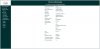
I have the phone connected to WiFi and I am able to connect to the phone via local IP address, but there is not where to place account details. Moreover, everything on the site is read-only, it doesn't appear I can edit any of the info from the web interface. See screenshot for the devices landing page.
Apparently Cisco doesn't allow you to add your own account details directly to the phone. Or maybe I'm missing something.
Never the less, has anyone had success getting this phone to work with 3CX? Or at least know how I can configure the device?
I have the phone connected to WiFi and I am able to connect to the phone via local IP address, but there is not where to place account details. Moreover, everything on the site is read-only, it doesn't appear I can edit any of the info from the web interface. See screenshot for the devices landing page.