Cisco SPA-122 Fail Registration

Status
Not open for further replies.

trihead

Free User
Joined
Jun 11, 2020
Messages
9
Reaction score
0
Hi Friends

I am trying to register the device but it fails

Is there any ATA available in the market which is compatible with 3CX?

Thanks in advance

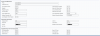
.SIP-SPA122.PNGSIP-SPA122.PNG
 
Is the device "remote", using STUN? Is STUN set correctly? Did you assign the 122 a static IP, and set to "Bridge" mode? Is the 122 behind a router, or does it have a public IP?

What does the registration attempt look like in the Activity Log? Does it show the local, or public IP of the ATA? That log is the place to begin trouble shooting.

I have never found it necessary to use the outbound proxy setting in my ATAs, remote or local, but that may not make any difference.

I should add that I have several SPA122s and an SPA-112 (only because I picked them up for very little at flea markets and the like), and I can say I'm not a big fan of the 122.

If you do not require the built in router, then avoid it and go with the 112.

Although it seem similar to it's predecessor, the SPA-2102, it has less flexibility if you want to rid yourself of the router, amongst other things. They seem to have "dumbed it down" a bit, and, has recently been discontinued/replaced.
 
Last edited:
Hi Leejor,

Thanks for the response. I didn't know it has a built-in router until I received it. the ATA has 2 ports and the internet port is connected to my local router. the server is remote on a cloud server but NOT 3cx cloud. Other desktop phones are working fine and as you mentioned they are set on STUN while provisioning with my 3cx PBX on the cloud. I didn't find this ATA in the list of devices when I was setting it up. it makes sense to enable STUN on this extension but what device should I choose?

Thanks again for the tips. I will look at it again when I go back to office on Monday.

Cheers
 
I didn't find this ATA in the list of devices when I was setting it up. it makes sense to enable STUN on this extension but what device should I choose?

It's' not an officially supported device, so not matter what (device) you choose when creating the extension, you'll just be taking the provided information, and manually provisioning the ATA.

There are a number of other posts on the forum about the 112 (fewer regarding the 122), which, with the exception of the router is very much the same

https://www.3cx.com/community/threads/3cx-and-cisco-spa112.53696/

https://www.3cx.com/community/threads/solved-cisco-spa112-id-since-v15-sp6.59069/

https://www.3cx.com/community/threads/failed-cisco-spa-112-with-3cx.64865/
 
Hi All,

I did all possible ways, I got SPA 112 and tried it. still doesn't register. :(

Regards
 
Does the 3CX Activity Logs show it trying? Might the IP be blacklisted?
 
The IP is whitelisted but I will check again. I tried the generate the activity logs but wondering why is blank.
 
The activity log won't be "blank" as the log show all call processing, but, there may not be a registration attempt showing. That usually means that the ATA server information, or perhaps, port, is not set to correctly reach the 3CX server, or, something is blocking the attempt.
 
The activity log won't be "blank" as the log show all call processing, but, there may not be a registration attempt showing. That usually means that the ATA server information, or perhaps, port, is not set to correctly reach the 3CX server, or, something is blocking the attempt.
do you mean 3CX activity log or ATA activity?
 
The 3CX Activity Log. That will show if the ATA is even reaching the PBX, or reaching it, and being rejected, for some reason.
 
The 3CX Activity Log. That will show if the ATA is even reaching the PBX, or reaching it, and being rejected, for some reason.
no, the IP is whitelisted. I assume somehow I have to add MAC Address in to 3CX server. to let the server and device see each other. I still didn't figure out where should I add the MAC Address?
 
No, the MAC is not used if you are manually configuring the device.
 
No, the MAC is not used if you are manually configuring the device.
I will try to work more on it. I should mention that I am using the standard edition. Do you think that can cause this issue?
 
It should not make a difference, you are registering a standard SIP device. First get it communicate to the PBX, then use the Activity Log to troubleshoot, if it fails to register.
 
Status
Not open for further replies.

Forum statistics

Threads
111,992
Messages
590,171
Members
164,931
Latest member
admintest