- Joined
- Jul 22, 2019
- Messages
- 147
- Reaction score
- 44
We have an agreement for data protection that we delete calls older than 2-3 months from the call logs.
Now I am facing the following problem:
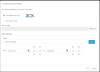
Under Reports - Settings there is the item clear call logs.
On the one hand, the area to be selected makes no sense here. You can only delete "current" calls here, like for example the last 30 days. But that doesn't make much sense here, who wants to delete them, it would make much more sense to delete anything older than 30 days, so that the last 30 days are preserved.
On the other hand, if I set up a user-defined area here (German translation for this is currently "Benutzerdefinierte Vorlage") and confirm it with Delete, then it supposedly deletes and also shows me a number, how much it has deleted now, but I still have calls in all call lists that go beyond the now remaining area and also the call list on the dashboard does not change the number. Even the logs of the users in the clients are still displayed from the time period that was actually cleared.
If you click on the button Clear call log on the dashboard, you can unfortunately only delete all calls. But this is stupid with running queue reports for the controlling department, because then you always get into either the monthly or the weekly reports and then they are incomplete.
Could you please clarify why deleting a user-defined area of the call logs has no effect on the call logs or what exactly is deleted here?
Of course it would be nice if the item "Delete call logs" could be found in the call log instead of in the reports and if you could also define a time period in the dashboard under call history, so that you can exclude the current reporting period.
It is even written here that you should delete the call log from time to time. I would like to limit this to a certain period of time.
Thank you.
Now I am facing the following problem:
Under Reports - Settings there is the item clear call logs.
On the one hand, the area to be selected makes no sense here. You can only delete "current" calls here, like for example the last 30 days. But that doesn't make much sense here, who wants to delete them, it would make much more sense to delete anything older than 30 days, so that the last 30 days are preserved.
On the other hand, if I set up a user-defined area here (German translation for this is currently "Benutzerdefinierte Vorlage") and confirm it with Delete, then it supposedly deletes and also shows me a number, how much it has deleted now, but I still have calls in all call lists that go beyond the now remaining area and also the call list on the dashboard does not change the number. Even the logs of the users in the clients are still displayed from the time period that was actually cleared.
If you click on the button Clear call log on the dashboard, you can unfortunately only delete all calls. But this is stupid with running queue reports for the controlling department, because then you always get into either the monthly or the weekly reports and then they are incomplete.
Could you please clarify why deleting a user-defined area of the call logs has no effect on the call logs or what exactly is deleted here?
Of course it would be nice if the item "Delete call logs" could be found in the call log instead of in the reports and if you could also define a time period in the dashboard under call history, so that you can exclude the current reporting period.
It is even written here that you should delete the call log from time to time. I would like to limit this to a certain period of time.
Thank you.