Click-to-dial not working since Chrome update

Status
Not open for further replies.

Daan L

Platinum Partner
Advanced Certified
Joined
Jul 24, 2020
Messages
25
Reaction score
1
Click-to-dail not working since Chrome update.

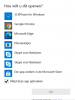
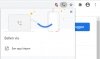
Certain links trigger a Chrome pop-up (i.e. the number Google displays on the right). I have to select an application to open the URL. This is perfect when using an installed phone application, but not when using a Chrome plugin.

When selecting Chrome to open the phone number URL, Chome opens a new session.

Is there a way to solve this?
 

Attachments

  • OpenPhoneURL.png
    OpenPhoneURL.png
    8.6 KB · Views: 10
Hello @Daan L ,

Can you please send us an example that before was working and now it is not working.

In the past the exact same website was opening up the chrome extension with the number inside the dialer, and now you get a prompt to select an application?
 
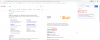
When clicking the number the pop-up in the top right corner appears. When clicking "Een app kiezen" (select an application), screenshot 2 appears.

Selecting Chrome does not solve the issue.
 

Attachments

  • ChooseApp.png
    ChooseApp.png
    98.2 KB · Views: 16
  • ChooseApp2.png
    ChooseApp2.png
    20.2 KB · Views: 15
Hi Daan,

You will notice that plain numbers are underlined by our plugin, and those work just fine.

As for the number from your screenshot? That number is not actually a plain text number, that's a hyperlink in Google and this is why it and other similar hyperlinked numbers currently don't work.
 
Hello John,

Will 3CX create a fix?

If so, any idea how long it will take?
 
No, because this would mean we would have to start modifying hyperlinks and this is not acceptable (it would also break valid hyperlinks).
 
Status
Not open for further replies.

Forum statistics

Threads
112,349
Messages
592,026
Members
165,512
Latest member
gmacinit