Solved Click2Meet not working

Status
Not open for further replies.

MannyL

Customer
Joined
Jul 19, 2018
Messages
42
Reaction score
10
Click2Meet has been enabled for multiple users but no one can join the meeting and are presented with "Meeting has not started yet. Retry later."

Anybody have any idea with what may be going on?
 
Hi Manny,

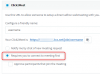
Notice the below setting:
1585641119095.png

The owner needs to join first, and the participants can then enter.
 
Hi John,

How does owner enter his own room? Can't click his own link as he gets the same error...and not the ad-hoc meeting either because joiner still gets same error

1585661087796.png
 
No one can just enter your private meeting room just because they have the link to it. You need to be present in your own private meeting room first before anyone else can join otherwise your meeting room would be prone to abuse.

In regards on how to enter your private meeting room, you need to go to the WebClient > WebMeeting. If this is not working for you, please post more info on what's happening.
 
You enter the ad hoc meeting like the one you circled above.

You press Log in

The person now enters the Click2Meet url in the browser and they should appear in your meeting
 
No one can just enter your private meeting room just because they have the link to it. You need to be present in your own private meeting room first before anyone else can join otherwise your meeting room would be prone to abuse.

In regards on how to enter your private meeting room, you need to go to the WebClient > WebMeeting. If this is not working for you, please post more info on what's happening.

Hi @LeonidasG

If I am in my room via "WebClient > WebMeeting" other attendees that use my Click2Meet uRL still get the same message of "Meeting has not started yet. Retry later."
 
Can you please verify that you are logged into the webclient of the extension you wish to use, and that you are using that specific extension's Click2Meet URL?

If you confirm this to be correct, than restart your services.
 
@JohnS_3CX Restarting services resolved issue. Do they have to be restarted every time I enable Click2Meet for a user? or change the Click2Meet settings?
 
Nope, not necessary only in case the system does not behave correctly for whatever reason, especially when you followed the correct procedure already.

I'm glad to hear it has been resolved!
 
Status
Not open for further replies.

Forum statistics

Threads
111,973
Messages
590,076
Members
164,895
Latest member
jasonkkrause