Clicktocall extension deploy config

Status
Not open for further replies.

mOrbo

Premier Customer
Joined
Jul 2, 2019
Messages
52
Reaction score
16
Hi,

we want to use the clicktocall extension with the Webclient (v18).

Manually it works as expected. But we want to deploy and register the extension for all our users automatically.
Deploying the extension for all User is no problem with the Edge/Chrome GPO "ExtensionInstallForcelist".

We now need to register the extension to the Webclient and set the proper URL for all users.

Is there a config-file or some parameters we can use to set the extensions URL-option below automatically for all users?
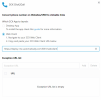

1666278175480.png

Thanks
 
Last edited:
Why not have them use the DesktopApp instead? It can also be installed via GPOs and you wouldn't have to configure the extension.

All the user would have to do is login to their webclient, click the Windows/Mac icon and click "Provision".
 
Thanks for the tip. That was also our backup-plan.

I prefer the webclient solution, because you don't need any client-updates or user-interaction at all.

My apprehension is, that 3CX will switch completely to the webclient in the near future (as everybody does). Why use an extra app with exactly the same functions as the webclient? At this point, all users have to switch again to another solution.

But without a global config for the webclient as described above, the webclient is to complex to configure for the users.
 
Last edited:
Hi,

we now tried the 3CX Desktop-App.

This is sadly not working as expected.

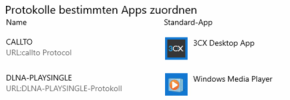
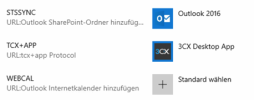
The Desktop App is only registering the "callto" protocol, but not the "tel" protocol:

1667483392851.png
1667483407214.png

A Click on a link using the "callto" protocol is transferring the number properly to the Desktop-App.

But our CMS is using "tel". So nothing happens when you click on a link, because the OS doesn't know the "tel" protocol.

Also the Browser-Plugin is not working. It does change numbers to a hyperlink. But if you click, nothing happens. It think the plugin also uses the "tel" protocol?

Any help from 3CX? Why is the Desktop-App not creating and binding the "tel" protocol to itself during the installation?

Thanks!
 
Last edited:
If anybody else is facing this problem, set this reg-key with a GPO:

Code:
[HKEY_CLASSES_ROOT\tel]
"URL Protocol"=""
@="URL:tel Protocol"

After that, the user gets a prompt to bind "tel" to the 3CX App.
The protocol should be created during the installation of the app, but I can live with this workaround.
 
Status
Not open for further replies.

Forum statistics

Threads
112,351
Messages
592,037
Members
165,515
Latest member
fngl