Client don't show extensions

Status
Not open for further replies.

erpardeiro

Free User
Advanced Certified
Joined
Aug 2, 2019
Messages
67
Reaction score
9
Hi,

I have a problem in a customer. All clients can't see extensions in 3CX Client, but only in office, out office its work normally.

See bellow:
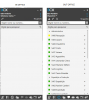
3CXFail.png

How can I solve this?
 
Check the server settings under account within the 3cx client

I would say it’s a dns issue, where internal is looking for server fqdn but it does not exist in the local dns server.

You need to add the server fqdn to your internal dns server but set to the ip to the internal server ip
 
From your screenshots it looks like you do not have presence when in office which looks like a network issue. Are the clients in the same LAN as the PBX?
 
Hi...

I don't use fqdn internal, the connection between client and server is maked with IP address. See:

3CXFail2.png
 
What is the local IP of the client?
 
do you have 5001 port open?
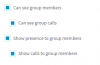
Rights are set
1584110165894.png

Do you have same behavior with webclient?
-
 
Last edited:
Try disabling the firewall on the PC and the Anti-Virus software as a test to see if that solves the issue.
Also try plugging the PC on a different switch
 
Status
Not open for further replies.

Latest Posts

Forum statistics

Threads
111,940
Messages
589,845
Members
164,828
Latest member
Vera Lea Kristensen Raage