Client not fully connecting under VPN

Status
Not open for further replies.

xbheat

New User
Joined
Aug 10, 2021
Messages
6
Reaction score
0
Hi everyone,

I'm experiencing a weird scenario, we have our pbx hosted with an external provider, from our corporate LAN we can register our extentions with no problem and have all services available. However when we try to do the same connected to our SSL VPN the client registers, and we can make or receive calls, but the directory won't load, and features like conference, recording, and so on are not available, on the client for example we only see the conference button greyed out, and if we try to make a call and start a conference from there when we click the button nothing happens, it looks like clicking a blank button!
I looked at firewall rules and nothing is different on the LAN and on the VPN, all ports are open, and we can reach the pbx, a tracert to the public IP where the pbx is hosted shows exactly the same hops on both networks, so I don't know what else I'm missing

Has someone experienced anything similar?

Best regards :D
 
Hi cheat,

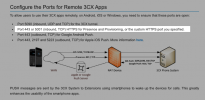
Please make sure 3CX presence port 443 or 5001(TCP) allowed in the SSL VPN?
Screenshot 2021-08-10 at 2.49.50 PM.png
 
What 3CX Version are you running?

Also, assuming this is the 3CX Windows App, have you tried completely exiting and re-launching it after the VPN connection has been established?

As a test try accessing the 3CX Webclient and then actually use it while connected to the VPN, does that work?
 
What 3CX Version are you running?

Also, assuming this is the 3CX Windows App, have you tried completely exiting and re-launching it after the VPN connection has been established?

As a test try accessing the 3CX Webclient and then actually use it while connected to the VPN, does that work?
Hi Chris,

Running version 16.3.0.220
And yes I've tried relaunching with the same results :/

I just did what you said of the webclient and it does work with no issues, the problem is only with the softphone :(
 
Is the VPN connecting to site with the 3CX Windows App and the site with the PBX?
If yes, how did you access the 3CX Webclient, was it with the PBX's local IP or FQDN?

Do you have more 3CX Windows Apps on different PCs with different extensions all using the same VPN connection and all facing the same issue, or is this the only affected one?
 
Is the VPN connecting to site with the 3CX Windows App and the site with the PBX?
If yes, how did you access the 3CX Webclient, was it with the PBX's local IP or FQDN?

Do you have more 3CX Windows Apps on different PCs with different extensions all using the same VPN connection and all facing the same issue, or is this the only affected one?
From either LAN or VPN we connect through a fqdn, we don't have it locally deployed

Tried with different extensions on another PC all with the same problem :/
 
This definitely sounds like something related to the VPN configuration as that seems to be the only common denominator. I suggest reviewing the network configuration applied for when the VPN is in use to hopefully manage to reach a conclusion.

As Naveen | Cal4care already mentioned presence information such as contacts, recordings, voicemail relies on the connection to 3CX's HTTPS port (default: 443/5001) so I recommend looking into any rules involving these ports specifically and generally checking for any network restrictions/firewall services that might be hindering this traffic in any way.

You might also want to consider contacting one of our partners to have them help you investigate this issue even further: https://www.3cx.com/ordering/find-reseller/
 
This definitely sounds like something related to the VPN configuration as that seems to be the only common denominator. I suggest reviewing the network configuration applied for when the VPN is in use to hopefully manage to reach a conclusion.

As Naveen | Cal4care already mentioned presence information such as contacts, recordings, voicemail relies on the connection to 3CX's HTTPS port (default: 443/5001) so I recommend looking into any rules involving these ports specifically and generally checking for any network restrictions/firewall services that might be hindering this traffic in any way.

You might also want to consider contacting one of our partners to have them help you investigate this issue even further: https://www.3cx.com/ordering/find-reseller/
Hi again Chris,
Another update... I ran the client on 2 different devices, both on the same subnet, with the same network configuration (LAN), same windows 10 image, the only difference being that one is a virtual machine and the other a physical HP workstation.
On the VM the soft phone registered with all the features available, while the physical workstation didn't. The workstation only registered to receive/make calls but no other feature available like presence or conferencing.

:/
 
Hi again guys, another update here...
I found that on the device that allows me to fully register I see traffic on 5090 and also https traffic. On the other hand on the devices that won't completely register I only see traffic on 5090, I double checked and the traffic for https is obviously open (both devices are on the same subnet) and also there are no attempts of traffic over there (so there are no chances of it being blocked), it just seems that the softphone is refusing to send traffic to https to retrieve presence info
 
I ran the client on 2 different devices, both on the same subnet, with the same network configuration (LAN), same windows 10 image, the only difference being that one is a virtual machine and the other a physical HP workstation.
So both environments had the VPN client connected too?

Hi again guys, another update here...
I found that on the device that allows me to fully register I see traffic on 5090 and also https traffic. On the other hand on the devices that won't completely register I only see traffic on 5090, I double checked and the traffic for https is obviously open (both devices are on the same subnet) and also there are no attempts of traffic over there (so there are no chances of it being blocked), it just seems that the softphone is refusing to send traffic to https to retrieve presence info
Not seeing any HTTPS traffic at all would be very strange. On what which interface did you monitor the traffic?
 
Status
Not open for further replies.

Forum statistics

Threads
112,349
Messages
592,027
Members
165,513
Latest member
megalmazan