CM.COM (NL) not available when adding a SIP Trunk

Status
Not open for further replies.

Nusje

SOHO User
Joined
Aug 25, 2023
Messages
5
Reaction score
0
a SIP-trunk provider that is listed on the official 3CX “supported providers — Netherlands” page does not appear in my 3CX environment when I attempt to add a trunk. I am using a hosted (or on-premise) installation and when I go to Voice & Chat → Add Trunk, the provider simply isn’t in the dropdown list even though it should be supported per the partners page.

I double-checked the official list here: the provider is shown under “Supported SIP-trunks (NL)”.

I also followed the normal trunk-adding procedure according to the documentation.


Could this be a bug or is there an extra step needed for this provider to become available in the interface? Has anyone else experienced the same issue or found a workaround?
 
Hi @Nusje

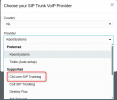
Please note that CM.com is not available in SMB but it should be available in Hosted by 3CX and on-premise installations. Make sure you select NL as the country and it should be there. Just checked on my Update 7 and I can see it just fine.

1764661107556.png

You can also check if the template is there by going to Advanced --> Templates --> Provider Templates and searching for cmcom.pv.xml
 
Hi @YiannisH_3CX ,

Was there somewhere I could find this information? I don't see it on the support trunk providers page, which seems very misleading.
 
So where you able to find in on your on premise installation? You mentioned you could not find it there either. Under each category you can see the compatible 3CX versions for each group.

Preferred Providers​

Preferred Providers are compatible with all 3CX installation modes. They are thoroughly tested with each build of 3CX and require no manual configuration. You can simply plug and play your PBX with a SIP Trunk of your choice.

Supported Providers​

Supported Providers are tested against 3CX Hosted and on-premise installations.
 
@YiannisH_3CX

I can find it in my on-premise installation, but given the size of the organization, there is a consideration for the 3CX free version. According to the portal, this is a hosted type.

The page: https://www.3cx.com/partners/sip-trunks/nederland/ shows CM.com as: Supported Providers are tested against 3CX Hosted and on-premise installations.

In other words, CM.com works in a hosted environment and, according to the portal, 3CX Free is a hosted environment, see screenshot:
 

Attachments

  • 3cx portal.png
    3cx portal.png
    6.8 KB · Views: 2
3CX Free is a hosted environment,
3CX Hosted is your own dedicated instance, either PRO or ENT, with cloud hosting managed by 3CX.

3CX Free is a shared instance, managed by 3CX and having some limitations in comparison to dedicated, one of which is that only a few select Trunk providers can work with it.
 
  • Like
Reactions: Evolute IT
I understand what you are saying, but the information provided on this subject is very poor. This information is nowhere to be found clearly stated.


In my opinion, nowhere is it clearly stated which trunk providers only work on premise and which ones work in your hosted environment.
 
In my opinion, nowhere is it clearly stated which trunk providers only work on premise and which ones work in your hosted environment.
3CX Free is not the same as Hosted, and, as you did, one can just create a free account and see exactly which providers are available.

Between actual Hosted and On-Prem there is no difference.
 
  • Like
Reactions: Evolute IT
Fine, but please update your information about this. This is simply disappointing customers because nowhere is a clear difference mentioned.
 
Status
Not open for further replies.

Latest Posts

Forum statistics

Threads
111,990
Messages
590,161
Members
164,926
Latest member
tohoken1