Codecs / Transcoding

Status
Not open for further replies.

SaraMarlar

Forum User
Advanced Certified
Joined
Sep 27, 2023
Messages
56
Reaction score
9
Hey guys, we completed a migration for a new client yesterday and they expressed that audio quality doesn't seem to be as good as before. They're using their pre-existing Yealink T48G phones, we set them up on a new cloud hosted V20 system with an enterprise license. We use Bandwidth.com trunks.

I enabled call quality monitoring for one of the users, and one of the reports for an INTERNAL call from one extension to another shows that one extension was using PCMU and the other was using G729, and it was transcoding.

If the trunk is set to use PCMU primarily, as thats what Bandwidth.com primarily supports, then why would these two extensions be using two different CODECs causing transcoding on internal calls?

Excuse my ignorance, I am not well versed with CODECs, so any insight you can provide in easily understood words would be fantastic.

Thanks!!
 
Hi Sara,

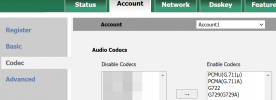
- Check the one that was using G729 and adjust codecs under User > IP Phone tab > Codecs to have PCMU on top
Note: it will reprovision the phone when you click save, buy you can also log into the phone to confirm if needed (don't edit from phone!)
1726671344492.png

- Also Dashboard > Advanced > Codecs should have PCMU on top for internal / external calls

- Finally the trunk should also have PCMU on top too.

This should pretty much eliminate transcoding, unless absolutely necessary.

The main takeaway is that if you have PCMU on top across the board, there will be virtually no need for transcoding to kick in.
 
This is extremely helpful!
The IP phones were set to PCMU > PCMA > G722 > G729. I removed the middle two since they're not supported by Bandwidth.
In Advanced > Codecs, it did not have PCMU at the top for WAN connected devices, so that must have been the problem.
 
When your phone sends an invite, it includes the codecs it can support, along with an order of preference. The two devices should negotiate the first match based on priority. So, rather than removing codecs, just change the preference order. After all, there is no reason why you could not use G722 for internal calls and PCMU for external calls..
 
  • Like
Reactions: SaraMarlar
In Advanced > Codecs, it did not have PCMU at the top for WAN connected devices, so that must have been the problem.
Exactly, this should take care of the problem.

You did not have to remove it from the phones by the way. Its used as a fallback if the need should ever arise but if its not there the phone may reject the call.
 
  • Like
Reactions: SaraMarlar
When your phone sends an invite, it includes the codecs it can support, along with an order of preference. The two devices should negotiate the first match based on priority. So, rather than removing codecs, just change the preference order. After all, there is no reason why you could not use G722 for internal calls and PCMU for external calls..
Okay, I see. How can the phones use G722 internally if Bandwidth doesn't support G722?
 
The only time Bandwidth is involved is when you are talking to someone outside your phone system. Extension-to-extension calls don't use Bandwidth. Even if the two extensions are remote, they communicate using the internet infrastructure not Bandwidth.
 
  • Like
Reactions: SaraMarlar
The only time Bandwidth is involved is when you are talking to someone outside your phone system. Extension-to-extension calls don't use Bandwidth. Even if the two extensions are remote, they communicate using the internet infrastructure not Bandwidth.
I see, so in that case, what should the priorities be? Should G722 be at the top so internal calls choose this before PMCU?
 
The only reason for transcoding is if the two phones do not have any matching codecs. Frankly, it's a little strange that your two phones couldn't come up with any combination of codecs that both phones support. I hesitate to make a firm recommendation.

If, for example, you have extensions at multiple locations that traverse over the internet to talk with each other, then G722 may require more bandwidth than is available. I remember the early days of VoIP where a 2MB internet connection was fast. But when you started adding browsing, and windows updates, and file downloads, and latency to the mix, that 2MB connection was quickly consumed.

Even today, if you are working from home and kids are playing video games, and watching Netflix, and Youtube, etc. it's not impossible to degrade your connection to the point where the codec is important.

On the other hand, if all the extensions are local to the 3CX server (so the data is not traversing over the internet) and you have a quality network infrastructure (including good wiring) then by all means use G722 first.
 
what should the priorities be?
I suggest using what your trunk uses so outgoing calls are not transcoded by the 3CX server. As noted the codec affects both quality and bandwidth. Bandwidth may not be as much of an issue if voice traffic is prioritized by the router, or there are not lots of phones/users at a location. Unfortunately there is not a separate codec setting for internal vs external calls, on desk phones.

There is a separate Advanced > Codecs setting for "LAN connected devices or Apps connected to WiFi" but despite the wording that does not apply if the 3CX server is hosted somewhere and not on that LAN...all devices/apps are remote in that case.

These may be helpful to you or others:
https://www.3cx.com/docs/sip-trunk-codecs-sdp/
https://www.3cx.com/blog/docs/bandwidth-utilised-for-voip/
 
  • Like
Reactions: NicholasP_3CX
Status
Not open for further replies.

Members Online Now

No members online now.

Forum statistics

Threads
111,831
Messages
589,277
Members
164,660
Latest member
RJenkinsROCK