- Joined
- Aug 27, 2020
- Messages
- 2
- Reaction score
- 0
Hi,
When I schedule a video conference through the webclient, if I select "3CX direct eMail" to send my invitations the recipients get the meeting instructions by email clearly with the correct text formatting as defined in the email templates.
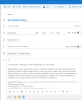
But if I select "Office365", it opens my Outlook calendar on the web, but in the meeting description all the instructions and conference notes are jam-packed in the same paragraph without line breaks or formatting. Is there a way to keep a clean formatting for the conference notes and instructions when scheduling through Office 365?
Thanks!
JF
When I schedule a video conference through the webclient, if I select "3CX direct eMail" to send my invitations the recipients get the meeting instructions by email clearly with the correct text formatting as defined in the email templates.
But if I select "Office365", it opens my Outlook calendar on the web, but in the meeting description all the instructions and conference notes are jam-packed in the same paragraph without line breaks or formatting. Is there a way to keep a clean formatting for the conference notes and instructions when scheduling through Office 365?
Thanks!
JF