Configuring BLF keys as Line keys

garrick.cobcroft@gsconsul

Silver Partner
Joined
Sep 1, 2022
Messages
75
Reaction score
16
Hello,

I have an issue, where I have a 3CX v20 8SC Pro system for a retailer that has a single 8CH trunk divided across 5 stores. The primary trunk number is answered by a digital receptionist, and then the call sent to the appropriate store via the menu selection. However even though I have the first 8 BLF keys designated as Line keys, only the BLF 1 ever lights up. So, if a call is in progress, the next call is dropped as there is no "line" to answer if that makes sense? The handsets are Yealink T53W.

Thanks,
Garrick
 
3CX is not a Key system, where the line keys indicate an available trunk.

The Line keys you see are the lines for the phone. Meaning that if you are talking to someone, and place them on hold, you can open a new line on the phone to make a new call.
 
Thanks Nicholas,
Yes - I do realise that. But in the same way, surely the next incoming call should also appear on the next free line? At the trunk level, there are still 7 free channels following the initial call, so the exchange will accept the next call, and attempt to pass it to 3cx. And indeed, the phones will ring, but the call can't be answered, as there's no line active. I'm clearly missing something pretty basic.
Thanks, Garrick
 
This depends on your setup.

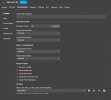
Do the phones have call waiting enabled?

1731658079622.png

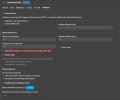
For a call coming into the queue, for agents to be able to have their phones ringing while they are already on the phone with another customer, you will need to have the option to taget busy agents active, in conjunction with the accept multiple calls option on the user

1731658184935.png
 
Yes, I have accept multiple calls enabled, but I'm not using a queue in this instance, just ring groups.
 
I'll try and simply the use case, to see if I can clarify it further..

Let's say we have 3 departments, sales, service and accounts... Now each department has one agent. Agent 1, agent 2 and agent 3. Now, all agents are responsible for answering sales calls.

At any point in time, any agent 1 could be in a call to a customer, or one of the other at agents. If she's on a call to another agent, both extension blf keys will need alight and the free agent knows to answer the next call. But let's assume the free agent is already on a call, how do the agents taking to each other know that there's an incoming sales call active, and subsequently answer it? Similarly, if all agents are talking to customers, agent 1 wants to hold the call she's on, answer the next call, place them on hold, and resume the call she was on??
 
A Ring Group doesnt have that functionality. You would need to convert them to queues.

My PERSONAL recommendation is whenever you are servicing customers, DONT use a Ring Group. Use a Queue. It has more functionality available without needing to do any workarounds.

Similarly, if all agents are talking to customers, agent 1 wants to hold the call she's on, answer the next call, place them on hold, and resume the call she was on??
You can park the calls and then retrieve them.
 
OK, thanks. I've converted the ring groups to Queues. I'll see how that goes tomorrow.

You can park the calls and then retrieve them.
I feel I'm still missing something very basic. How does the agent know a call is coming in in order to park the call she is on?
 
They would see the call coming in on their phone screen and hear the call waiting tone.
 

Forum statistics

Threads
111,956
Messages
589,927
Members
164,859
Latest member
MichaelRussell3