- Joined
- May 25, 2015
- Messages
- 25
- Reaction score
- 0
hello, confused..
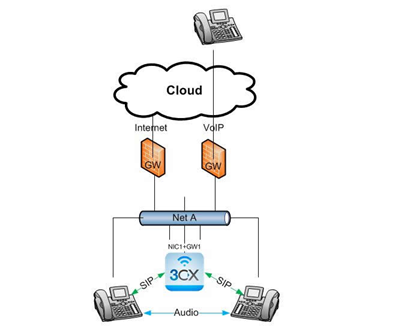
i have windows 2013 server with 2 NIC
My local engineers tell me i dont need a router
My Telco company tell me i do need a router
my LAN is on 192.168.10.x
my SIP provider tells me to set the card to 10.249.x.x <-- when i do this the SIP works but the LAN doesnt.
can i add a routing table to windows server? i dont think my adsl router allows this (why not? its the one the SIP Telco gave me!)
im going round and round in circles
Server 2013
2 x NIC (one set to 192.x.x.x / one set to 10.249.134.66 as requested by SIP)
3CX
i have windows 2013 server with 2 NIC
My local engineers tell me i dont need a router
My Telco company tell me i do need a router
my LAN is on 192.168.10.x
my SIP provider tells me to set the card to 10.249.x.x <-- when i do this the SIP works but the LAN doesnt.
can i add a routing table to windows server? i dont think my adsl router allows this (why not? its the one the SIP Telco gave me!)
im going round and round in circles
Server 2013
2 x NIC (one set to 192.x.x.x / one set to 10.249.134.66 as requested by SIP)
3CX