ConnectWise setup issue

Status
Not open for further replies.

AndrewK

Trainee Partner
Joined
Jun 29, 2021
Messages
6
Reaction score
2
Hi I have gone through the setup and can't determine why the test times out.

ConnectWise
1. Create API Member with Admin security role.
2. Create API keys for member

3CX
1. Set the company name
2. Copy in the Public and Private key
3. Set domain to our on-premise url
4: Test - fail
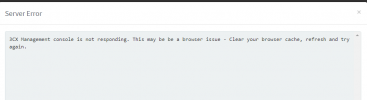
1625707031704.png

Check the server and there are no issues. Flush cache, same result.

Would love some pointers here please.

Thanks
Andrew
 
Use your own API key instead of an API member's keys.
 
Use your own API key instead of an API member's keys.
Really? I'll give that a shot but seems an odd approach. What happens if I leave the company and my CW account is either deactivated or delete?

UPDATE:
Unfortunately that hasn't worked either.
 
Last edited:
Really? I'll give that a shot but seems an odd approach. What happens if I leave the company and my CW account is either deactivated or delete?

UPDATE:
Unfortunately that hasn't worked either.
Okay that's odd.

so, is your on-prem instance accessible from the 3CX PBX? And where is the PBX hosted?
 
Hi I have gone through the setup and can't determine why the test times out.

ConnectWise
1. Create API Member with Admin security role.
2. Create API keys for member

3CX
1. Set the company name
2. Copy in the Public and Private key
3. Set domain to our on-premise url
4: Test - fail
View attachment 22852

Check the server and there are no issues. Flush cache, same result.

Would love some pointers here please.

Thanks
Andrew
If your 3CX server is on the cloud, and your ConnectWise server is in your LAN, then it will require some firewall configurations to allow 3CX query your CRM. Is this your scenario?
 
Hi, both systems are on premise, on the same LAN subnet, and both use a custom fqdn on split DNS whereby they resolve to the internal address (maybe that's having some impact?).
 
The first thing 3CX will do is sending a GET request to the following URL (build using the parameters you configure from the 3CX console):
https://[Domain]/login/companyinfo/[CompanyName]

You should first ensure that you can reach your CRM server from the 3CX server using that URL.
 
  • Like
Reactions: Evolute IT
HTTPS could be the reason if it isn't configured for the ConnectWise instance.
 
The first thing 3CX will do is sending a GET request to the following URL (build using the parameters you configure from the 3CX console):
https://[Domain]/login/companyinfo/[CompanyName]

You should first ensure that you can reach your CRM server from the 3CX server using that URL.
Thanks, there seems to be a communication issue to that API end point.
 
Thanks, there seems to be a communication issue to that API end point.
Important to note that Manage is case sensitive on the Company Name field. Example is not example. If on prem you can look at the database name to verify.
 
So we're a little further along but this isn't very helpful at all. Is this on the CW or 3CX side? And where to even begin looking?

System.Exception: Server returned a non successful status code - HTTPStatusCode=InternalServerError - Reason=Internal Server Error - Content=The page cannot be displayed because an internal server error has occurred.
 
If the URL mentioned doesn't load and display something like this:
1626145405489.pngit's on the CW side and start with CW support.
 
Turns out there's an issue with CW.

Thanks for the assist.
 
So we're a little further along but this isn't very helpful at all. Is this on the CW or 3CX side? And where to even begin looking?

System.Exception: Server returned a non successful status code - HTTPStatusCode=InternalServerError - Reason=Internal Server Error - Content=The page cannot be displayed because an internal server error has occurred.
An Internal Server Error is an error response returned by the CRM server. So the issue is on the CW side in this particular case.
 
Status
Not open for further replies.
