contact from phonebook is not displayed during outbound call

Status
Not open for further replies.

ChrisGER

SOHO User
Advanced Certified
Joined
Jul 14, 2019
Messages
29
Reaction score
12
Hello Community,
i've an 3CX parallel to my old PBX and a bit confused. I have the following behavior that I can not understand

Outbound call
i make a outbound call, the call is established, but not shoen the name to the dialed number. Number and Name are stored in the local addressbook.

Inbound Call

If i get an inbound call, and the name and phonenumber is safed in the contacts part, it will be displayed correctly in the call histroy.

I've no idea, why the IN-/OUTBOUND is different. Is this a known feature ?
 
Please expand local address book, is this local on the phone ? Or are you using the 3cx contacts address book
 
Sounds like a device issue. What type of set is it? If the dialed number, and the displayed number (incoming) are different, because of something like an access prefix, perhaps the set cannot make a match.
 
@Saqqara yes, i'm useing the 3cx contacts that is under advanced / contacts in the 3CX.

@leejor i'm useing a Yealink W70B DECT IP Base with an W56H Mobile.


What's configured in the SIP-Trunk

Caller ID

- Reformat Incoming or Outgoing Caller
- Phone Numer is international format "+49xxxx" cause some +1 and +44 are also in the contacts.

Inbound
Source Pattern = +49(.0)
Replace Pattern = 0\2\3

Outbound
Source Pattern = +49
Replace Pattern = 0\2\3

Dialing and outbound calls are working well. Only the resolution of the phone number via the Contacts do not run.
 
Actually, this seems to be device specific as I have just tested other devices and it seems to work just fine for both Inbound and Outbound calls but could reproduce the behavior you are describing when testing with the W70B and a W53H handset.

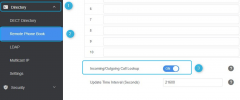
There exists a setting within the W70B's interface which I think yields the behavior you're looking for so you could give enabling it a try:
1638785678900.png


Bear in mind that Yealink has this setting off by default and one of the reasons for this is to increase performance as, depending on the directory size, enabling this setting may cause delays due to the directory lookup. That said, you can enable it and 3CX will not overwrite the setting via autoprovisioning. This would of course mean that you'll have to manually enable it on every affected device and then re-enable it in the event that you ever factory reset the device.
 
Actually, this seems to be device specific as I have just tested other devices and it seems to work just fine for both Inbound and Outbound calls but could reproduce the behavior you are describing when testing with the W70B and a W53H handset.

There exists a setting within the W70B's interface which I think yields the behavior you're looking for so you could give enabling it a try:
View attachment 26330


Bear in mind that Yealink has this setting off by default and one of the reasons for this is to increase performance as, depending on the directory size, enabling this setting may cause delays due to the directory lookup. That said, you can enable it and 3CX will not overwrite the setting via autoprovisioning. This would of course mean that you'll have to manually enable it on every affected device and then re-enable it in the event that you ever factory reset the device.
@ChrisC_3CX
thank for your reply. i've checked it on W70B and it was allready enabled from my side. the caller name is shown in the W56H (sorry not the W53H) mobile correctly. But maybe you know the other problem, that on a Yealink W56H only the office number from the 3CX Contacts is displayed (3CX remote phonebook), although I have also entered a private and an mobile number in the 3CX Contacts ?
 
Hello Community,
sorry for delay, but i've reinstalled my 3CX from the scratch and have the same feature (no name to dialed number in an outbound call) :( i see only the dailed number in the To section and no name like in an inbound call. The number is safed in the local contacts at the 3CX PBX. So any idea, what parameter ha to be checked / changed to see also the Name in a outbound call ?

thx forward
Chris
 
Hi Chris,

But maybe you know the other problem, that on a Yealink W56H only the office number from the 3CX Contacts is displayed (3CX remote phonebook), although I have also entered a private and an mobile number in the 3CX Contacts ?
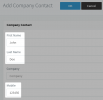
This is by design, only the highlighted fields are sent to the phones. This behavior cannot be changed.
1644241434500.png

Please tell us the following:

- What version is your 3CX system?
- What version is the W70B firmware
- What version is each handset's firmware?
 
Hello JohnS,
sad to know, that the highlited fields are send to the phones. :(

here are the values you asked for
- Version 18.0 (Build 314)
- W70B Firmware is 146.85.0.30
- Handset W56H Firmware is 61.85.0.35

When I get an inbound call, the name of the caller is displayed even if the phone number is entered in the "private" field. :(

Any further idea ?

Regards
Chris
 
When I get an inbound call, the name of the caller is displayed even if the phone number is entered in the "private" field.
Thanks for sharing the info Chris. Can you also tell me what your desired goal is?

You want to resolve both incoming and outgoing?
 
Thanks for sharing the info Chris. Can you also tell me what your desired goal is?

You want to resolve both incoming and outgoing?
Hello JonhS,
both companies (3CX / Yealink) should be interested (so the hope) that their products are connected as far as possible. currently it is at least on the part of Yealink wher "half-hearted". In how far the xml file on the part of Yealink are adapted for this is beyond my knowledge.

Imconning / Outgoing resolve by Name

Incomming

Incomming calls are resolved to the Name by the existing CX contat Information. Any number (Mobile / Landline). There is no issue at an inbound call.

Outbound
I Call the same number at Yealink, the 3CX is dailing and establishing the call, but in the 3CX Call LOG is only showing the number and not the Name (no phone Nubmer to Name conversion) by 3CX in this case.

Goal -> Dream
That you can link the fields maintained on the 3CX in the Contacts with the possible fields on the part of Yealink centrally in the 3CX, so that the desired fields are also transferred to the handsets during commissioning and are visible / searchable in the phone book of the handset.


Hope dies last ;)

Regards
Chris
 
Last edited:
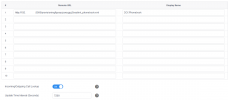
Not sure if W70B has this setting , but on the W52P we enabled 'Incoming / Outgoing Call Lookup'
 

Attachments

  • 1644836863855.png
    1644836863855.png
    20.5 KB · Views: 13
The solution is indeed the one my colleague Chris mentioned here


I've also tested this and can confirm that it works. This way you can resolve the names for both incoming and outgoing calls.
 
Hi @Saqqara and @JohnS_3CX
now it becomes exciting, because my screenshot corresponds to those of @Saqqara
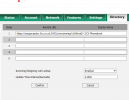
YEALINK_REMOTEBOOK.png

@Saqqara in my installation is port 5000 by default. it looks like you've changed the port to 5002 ?

Any idea, why in the 3CX Call Log is only the number shown ? any other topics to check on Yealink or 3CX ?

thx forward
Chris
 
Those are not numbers, they are URLs where the phonebook is fetched.

If your handset phonebook is populated, then there is nothing wrong with your settings.

Dial out an entry directly from your "3CX Phonebook", and see if the name is displayed.
 
Those are not numbers, they are URLs where the phonebook is fetched.

If your handset phonebook is populated, then there is nothing wrong with your settings.

Dial out an entry directly from your "3CX Phonebook", and see if the name is displayed.
And now i'm back in reality, cause the 3CX Phonebook show only the name and office number. private/mobile number is not listed in the 3CX Phonebook (on my Yealink device).

:confused:
Chris
 
Last edited:
Actually, this seems to be device specific as I have just tested other devices and it seems to work just fine for both Inbound and Outbound calls but could reproduce the behavior you are describing when testing with the W70B and a W53H handset.

There exists a setting within the W70B's interface which I think yields the behavior you're looking for so you could give enabling it a try:
View attachment 26330


Bear in mind that Yealink has this setting off by default and one of the reasons for this is to increase performance as, depending on the directory size, enabling this setting may cause delays due to the directory lookup. That said, you can enable it and 3CX will not overwrite the setting via autoprovisioning. This would of course mean that you'll have to manually enable it on every affected device and then re-enable it in the event that you ever factory reset the device.
 
Would anyone happen to know the parameter for this change in the xml file so we can update the setting for all Yealink phones?
 
Would anyone happen to know the parameter for this change in the xml file so we can update the setting for all Yealink phones?
It may vary based on model, but check your XML for features.remote_phonebook.enable
 
Status
Not open for further replies.

Members Online Now

No members online now.

Forum statistics

Threads
111,832
Messages
589,285
Members
164,662
Latest member
DejanMDS