Contact Search gives Response but still shows number does not exist?

Status
Not open for further replies.

Jijo_Raj

Forum User
Joined
Jun 21, 2020
Messages
63
Reaction score
2
1593692809666.png

Hi Support,

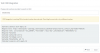
I tried a contact lookup with my CRM and it give me the contact details. But why does it shows a warning that contact number does not exist?

Also if i search a number that is not in my database, it says JSON response null.

Kindly help me sort this.

Thanks in advance
 
From your screenshot, I can see that you're not properly mapping the values from the response to variables, and then to outputs. Then, the 3CX CRM engine doesn't receive the contact details.

If you share the template you created so far, I can give you some pointers on how to adjust it.
 
Hi Edos,

Here is the template. Kindly have a look and let me know where is my mistake.

<Scenarios>

<Scenario Id="" Type="REST">

<Request Url="http://domain_path/ajax/search_contact.php?number=[Number]" MessagePasses="0" RequestEncoding="UrlEncoded" RequestType="Get" ResponseType="Json" />

<Rules>

<Rule Type="Any">contact.id</Rule>

</Rules>

<Variables>

<Variable Name="ContactID" Path="contact.contactid">

<Filter />

</Variable>

<Variable Name="FirstName" Path="contact.firstname">

<Filter />

</Variable>

<Variable Name="PhoneMobile" Path="contact.phonemobile">

<Filter />

</Variable>

</Variables>

<Outputs AllowEmpty="false">

<Output Type="ContactID" Passes="0" Value="[ContactID]" />

<Output Type="FirstName" Passes="0" Value="[FirstName]" />

<Output Type="PhoneMobile" Passes="0" Value="[PhoneMobile]" />

<Output Type="ContactUrl" Passes="0" Value="http:// domain_path /create_bookings.php?customer_id=[ContactID]" />

</Outputs>

</Scenario>

<Scenario Id="CreateContactRecord" Type="REST">

<Request SkipIf="[CreateContactEnabled]!=True" Url="http:// domain_path /create_bookings.php" MessagePasses="0" RequestContentType="application/json" RequestEncoding="Json" RequestType="Post" ResponseType="Json">

<PostValues Key="">

<Value Key="firstname" Passes="1" Type="String">3CX contact</Value>

<Value Key="phone" Passes="1" Type="String">[Number]</Value>

</PostValues>

</Request>

<Rules>

<Rule Type="Any">contact.contactid</Rule>

</Rules>

<Variables>

<Variable Name="ContactID" Path="contact.contactid">

<Filter />

</Variable>

<Variable Name="FirstName" Path="contact.firstname">

<Filter />

</Variable>

<Variable Name="PhoneMobile" Path="contact.phonemobile">

<Filter />

</Variable>

</Variables>

<Outputs AllowEmpty="false">

<Output Type="ContactID" Passes="0" Value="[ContactID]" />

<Output Type="FirstName" Passes="0" Value="[FirstName]" />

<Output Type="PhoneMobile" Passes="0" Value="[PhoneMobile]" />

<Output Type="ContactUrl" Passes="0" Value="http:// domain_path /create_bookings.php?customer_id=[ContactID]" />

</Outputs>

</Scenario>

</Scenarios>
 
The lookup scenario is wrong according to the JSON I see in your screenshot.

For example, the Rule element is filtering by "contact.id", but there is no "contact" object in your JSON. Only a property named "contactid", so your rule should be:
<Rule Type="Any">contactid</Rule>

Next, when you try to get the values for the variables, you're using wrong paths. For example, the path you're using contact.contactid doesn't exist. You should use just contactid, firstname, and so on...
 
  • Like
Reactions: Jijo_Raj
Thanks Edos,

It worked. you rock!
 
  • Like
Reactions: edossantos
Status
Not open for further replies.

Latest Posts

Forum statistics

Threads
112,325
Messages
591,898
Members
165,477
Latest member
Mueller