Contacts with multiple numbers from 3CX not transferred properly to my phone devices.

Status
Not open for further replies.

P.I.

New User
Joined
Oct 18, 2023
Messages
5
Reaction score
0
Hello,
I have a problem with my contacts.
In 3cx contacts there are contacts that contain more than one phone number. When the 3cx phonebook sync with my yealink devices each contact contains only one number, the number that matches the field ''mobile''. All the other numbers are not contained in the contact details. As a result, when another number from the contact calls me, i only see the number and not the name of the contact calling me and i dont know who is calling me. Same when i want to call someone from my contacts and the number i want to call is not in the field ''mobile''.
How can i solve this problem and my contacts in my yealink devices have all the numbers in each contact.
Waiting for your replies.
Thank you!
 
Hi, this is the default behaviour, only the contacts with mobile phone will be synchronized to the deskphone. If you get the Phonebook URL in your browser you can check it.

Now using the 3cx apps you could see the other numbers.

Have a great day!
 
Thank you for your answer.
Yes, but this fact causes problem to the whole company cause when a customer calling from another number, except from the mobile is saved, we are not able to see the name and know who is calling. Our employees dont have access to 3CX and they cannot check each phone number.
Is there any way to transfer the contacts to the phone devices with all the numbers each one includes?
 
I am afraid that in this case would be better using a CRM instead, it will match the contact number and forward the information to the endpoint.
 
Thank you for your answer.
Yes, but this fact causes problem to the whole company cause when a customer calling from another number, except from the mobile is saved, we are not able to see the name and know who is calling. Our employees dont have access to 3CX and they cannot check each phone number.
Is there any way to transfer the contacts to the phone devices with all the numbers each one includes?
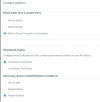
Also, please note that when receiving an incoming call, the pbx will try to perform a contact lookup, if the caller id matches one of the contact stored in the Global Phonebook, then the system will send the contact Name as Display Name.

From the PBX Management Console --- advanced --- contacts --- options --- Match Called id to a contact entry.

1697636504598.png


Also check in your sip trunk that the inbound parameters are configured correctly in order to get the caller id.

Have a great day!
 
how our CRM will talk with phone devices through 3cx ?
 
how our CRM will talk with phone devices through 3cx ?
When there is an incoming call the pbx will perform a contact lookup in the CRM, if the caller id exists as a contact, then the system will send the contact details as Display Name.
 
The name will appear in the display of the phone device or on 3cx app display?
 
And also how my crm talks with 3cx? All the crm are compatible to 3cx platform?
 
And also how my crm talks with 3cx? All the crm are compatible to 3cx platform?
Here you can find the supported CRM

You may try one so you can see how it works.

The contact Name will be sent as Display Name for any endpoint used.

 
Status
Not open for further replies.

Forum statistics

Threads
111,832
Messages
589,284
Members
164,662
Latest member
DejanMDS