- Joined
- Jun 2, 2015
- Messages
- 65
- Reaction score
- 6
Hi,
I'm trying to assist a client to integrate their 3CX system with Dynamics 365. We have the server side working and call journalling is working as expected.
What we cannot seem to get working is this mysictal "contact pop up" and click to dial from the CRM.
They are using the WebClient in Google Chrome. Should we have the 3cx browser extension installed in Chrome for this functionality, or not?
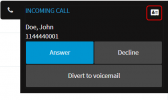
We cannot seem to get the CRM contact to pop up when a call is received. At one stage NOT running the extension we were able to get a small contact card icon to appear next the the caller ID in the browser, but it wasn't a pop up by any means.
Any help would be appreciated.
I'm trying to assist a client to integrate their 3CX system with Dynamics 365. We have the server side working and call journalling is working as expected.
What we cannot seem to get working is this mysictal "contact pop up" and click to dial from the CRM.
They are using the WebClient in Google Chrome. Should we have the 3cx browser extension installed in Chrome for this functionality, or not?
We cannot seem to get the CRM contact to pop up when a call is received. At one stage NOT running the extension we were able to get a small contact card icon to appear next the the caller ID in the browser, but it wasn't a pop up by any means.
Any help would be appreciated.