CP920 Speakerphone

Status
Not open for further replies.

Alphabetic

3CX MVP
Silver Partner
Advanced Certified
Joined
Jul 1, 2016
Messages
6,533
Reaction score
2,558
Hi all

is it possible to send the audio out of this speaker when it's set up on bluetooth?

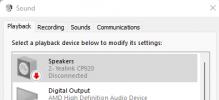
so far i dont appear to be ble to select this device as the output.

(calls work fine from the phone portion of the device)
 
Not really a 3CX thing, but yes I have managed to connect it to a laptop as a bluetooth speaker before.

It will show up twice in your windows audio devices, one is the "Stereo" mode and the other "Handsfree" mode.

Pick the first one if its for audio playback, and the second one if you plan on using it as a "headset"
 
Not really a 3CX thing, but yes I have managed to connect it to a laptop as a bluetooth speaker before.

It will show up twice in your windows audio devices, one is the "Stereo" mode and the other "Handsfree" mode.

Pick the first one if its for audio playback, and the second one if you plan on using it as a "headset"
Yeah i'd thought that too but it's been a pain

1645613818468.png

If i enable it it goes back to disconnected.

So im unable to select it from the 3CX App to use as a speaker.
 
Sorry I just realized I had done this on the CP960, not the 920 but I suspect they should behave similarly.

Bluetooth can be a bit flaky sometimes, I've gotten mixed results with different adapters from time to time. Good luck!
 
yeah is a bit flakey, did a factory reset and it showed up and then disappeared again. PITA.
 
Hi John,

the latest 3CX FW doesnt let me output to speakers on the CP920.

On the CP920 I press the BT button > 2. > and then option on my device > Detail and I have no option for "channel control".

If I downgrade to 78.85.0.5 I have this option to select on the handset.

From this menu I can enable "Media audio".
 
Hi @kieferschild

As these devices are moving to EOL now, I doubt Yealink will give us newer firmware.

But that aside, we would not really bother them about non-3CX related such as Bluetooth.

Feel free to contact them directly and see if they have any solutions / workarounds for this.

You might also find something on their Forums if you do a quick search.
 
Is the CP960 going EOL?
 
The CP920 & CP960 will be moving to the EOL template starting with V18U3.

The CP925 and CP965 will be replacing them, so going forward we would recommend those models.
 
I'm running Version 18.0 Update 5 (build 418) and unable to add a CP960, it is no longer listed in the drop down, in fact there is not a "Legacy" section in the drop down. I was able to add the CP960 on a system I built last Sept., which is v18.0 Update 3 (build 461), which has a section called "Legacy" and the CP960 is listed. We have 3 of these conf. phones, new as they were purchased a few months back yet I cannot add them. Any suggestions?
 
Status
Not open for further replies.

Members Online Now

Forum statistics

Threads
111,832
Messages
589,285
Members
164,662
Latest member
DejanMDS