Crazy queue behaviour!

Status
Not open for further replies.

rogerlightfoot

Free User
Joined
Apr 10, 2019
Messages
13
Reaction score
1
We are running Version 16.0.9 in Windows Server 2019.

Incoming calls for selected DDI's are routed to call queues. This has been working like a charm for 12 months.

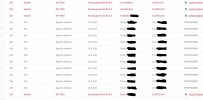
Just recently we have been suffering from some very odd behaviour. A single incoming call to a DDI can result on 10 or more simultaneous calls from the caller being listed in the active calls screen and allocated to a single queue. When a member of the queue answers the phone they hear noting and the caller continues to hear the ringing phone.

This results in our exceeding of 16 simultaneous calls licence rendering the system un-operational.

We have spent days trying to solve this intermittent and seemingly random problem.

Does anyone have any ideas as to what might be causing this please and a possible resolution.

Any help will be much appreciated.

Thanks - Roger Lightfoot
 
  • Like
Reactions: ChrisC_3CX
@rogerlightfoot
Do provide the information mentioned by @cobaltit , in the meantime also check the extensions that are members of the Call Queue for any settings such as "Ring my mobile simultaneously" that may be contributing to the multiple calls. If this setting is enabled, check the mobile number for each extension, what is it set to?

I am suspecting a loop of some sort. Also if users are using deskphones, maybe also check if someone has set some sort of unconditional forwarding on one of them.
 
  • 3CX Version, Enterprise Annual 16.0.9
  • Server OS, Windows Server 2019
  • Is the 3CX Server Hosted and where? Local install. VM on Hyper-V
  • IP Phone Make/Model/Firmware - Yealink T46S - Version 66.85.0.5
  • Provisioning Method: Local
  • Trunk Provider or Gateway Make/Model - Gamma SIP
  • Has the Firewall Checker passed: YES
  • Are custom Phone Templates being used: NO
 
I'd recommend replicating the issue and taking a look at the Active Calls while doing so (Dashboard >> click on "Number of Calls in use"). This may give you a hint as to what is going on as this may very well be caused by some sort of a loop due to 3CX configuration. Remember to check settings like "Ring my mobile simultaneously" and generally where calls are being routed for the involved Call Queues and extensions, etc.
 
I'd recommend replicating the issue and taking a look at the Active Calls while doing so (Dashboard >> click on "Number of Calls in use"). This may give you a hint as to what is going on as this may very well be caused by some sort of a loop due to 3CX configuration. Remember to check settings like "Ring my mobile simultaneously" and generally where calls are being routed for the involved Call Queues and extensions, etc.
Thanks Chris.

I've checked. Pretty sure "Ring my mobile simultaneously" is not active. I've seen this happen whilst watching the Active Calls but this gives no clues. We receive about 600 calls a day and this only happens 2 or 3 times. But when it does, it sometimes requires a reboot to overcome. Very frustrating.
 
In that case, do note that troubleshooting this issue will require a more in-depth investigation in order to identify the origin of these calls and to determine whether or not it may be related to 3CX's configuration. That said I'd highly recommend that you contact one of our 3CX Partners so that they can help you with this investigation.
 
Could this be part of the problem? Once user (Cherry) who is a member of one of the problem queues has multiple instances of her Android App listed in the phones list.

3CX.JPG
 
If it tries to ring all of them I would imagine so!
 
If it tries to ring all of them I would imagine so!
Me too!

But how does one mobile app on one mobile phone end up provisioned multiple times I wonder?
 
I think it's set by default but I would confirm that extension is set to use the tunnel for the app (under phone provisioning) and then re-provision the phone. If it's doing direct SIP some weird network issues could be causing that.
 
I think it's set by default but I would confirm that extension is set to use the tunnel for the app (under phone provisioning) and then re-provision the phone. If it's doing direct SIP some weird network issues could be causing that.
Thanks, I'll take a look.
 
I have also found that trying to use the "Phone UI" will not work with the phone that have the updated version of firmware (66.86.0.5).
 
Status
Not open for further replies.