Create Public SBC

Status
Not open for further replies.

OdyNet

Free User
Joined
Jan 5, 2024
Messages
12
Reaction score
1
Can I create a Public SBC so that I can send preconfigured IP Phones out and have them provision (see image below)? I would prefer to not have to send an SBC out with every desk phone.
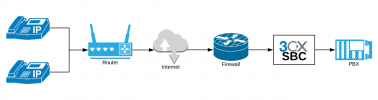
Blank Diagram.png

I am aware this would be for a Self-Hosted or On-Prem instance, but there is virtually no documentation regarding this.
 
Use router phones, problem fixed.

They have a built-in SBC.
 
  • Like
Reactions: accentlogic
That ^ , but to the original question the SBC runs in the same network as the phone.
 
  • Like
Reactions: Evolute IT
Forgive me for not clarifying. I am aware that the SBC normally resides on the same subnet as the IP Phones. I'm also aware that there are IP Phones with SBC functionality built in. Essentially, I am aware of nearly every configuration based on 3CX documentation to configure, manage, and maintain IP Phones with SMB, Hosted, Self-Hosted, and On-Prem instances. The company I work for hosts On-Prem in a data center and essentially offers a psuedo cloud-based instance for our voice customers. With remote users continuously on the rise since the "pandemic" occured, I want to see about creating a SBC instance that is public from the PBX side instead of several SBC instances from the IP Phone side.

BTW, thank you for the quick responses. I am advanced certified and a silver partner through my work. Please feel free to elaborate as technically as possible.
 
I am aware that the SBC normally resides on the same subnet as the IP Phones.
Fine, if you have multiple phones at a remote location, but, if you are handing out phones for users to plug in at remote locations, they can be router phones, and expected to work just about anywhere. A router phone is not required to host other phones, but it can.
 
  • Like
Reactions: Evolute IT
Fine, if you have multiple phones at a remote location, but, if you are handing out phones for users to plug in at remote locations, they can be router phones, and expected to work just about anywhere. A router phone is not required to host other phones, but it can.
I appreciate your comment, but this is not answering my question.

As I previously mentioned, I am fully aware of and successfully deployed nearly every way to provision and register an IP phone. I am, very specifically, asking if I can create a public SBC and if I can, what needs to happen to accomplish that. I need to know if this can be an option.

From my experience, when an SBC is on the same subnet as the IP Phones, there are no denying NAT/Firewall rules and all ports can be traversed without restriction .. it's an internal connection, after all. But based on the diagram I originally submitted, the SBC is now behind a firewall on the PBX side so in order for remote IP phones to talk to the SBC, ports would need to be forwarded to the SBC. What ports would those be? Can the SBC even function in this manner?
 
The short answer is no. Maybe something with a site to site VPN. (edit: at which point an SBC isn't necessary)
 
As far as I'm aware the 3CX SBC must be deployed at the remote end, not at the same location as the PBX. If this were possible, then I'm sure that good folks at 3CX would have devised this sort of thing years ago as it would obviously make remote deployment a lot easier.
 
Last edited:
I setup a remote PBX and SBC on the same internal subnet and each has a NAT to different public addresses. The SBC shows in 3CX SIP settings as being properly registered. This confirms that the SBC works with PBX locally which should be a given.

Now, from another remote location, on a Yealink T46S desk phone, I can go to Network tab and create a Manual NAT of the public IP for the SBC. I can then go into the Account tab and manually enter the account extension information, SIP Host FQDN, and select the Manual NAT. The phone registers successfully and I successfully tested calls internally and externally. So a Public SBC is somewhat usable.

What I couldn't do and is a big probem I have now, is that I can't provision the extension through standard auto-provisioning configurations. I think there are some ports that are needed for this to operate or some other network protocol. Any ideas?
 
I setup a remote PBX and SBC on the same internal subnet and each has a NAT to different public addresses. The SBC shows in 3CX SIP settings as being properly registered. This confirms that the SBC works with PBX locally which should be a given.

Now, from another remote location, on a Yealink T46S desk phone, I can go to Network tab and create a Manual NAT of the public IP for the SBC. I can then go into the Account tab and manually enter the account extension information, SIP Host FQDN, and select the Manual NAT. The phone registers successfully and I successfully tested calls internally and externally. So a Public SBC is somewhat usable.

What I couldn't do and is a big probem I have now, is that I can't provision the extension through standard auto-provisioning configurations. I think there are some ports that are needed for this to operate or some other network protocol. Any ideas?
I have some correctiions and additions for this.

  • Provisioning is done by the PBX, anyway, as long as port 5001 is open as per standard 3CX router/firewall configurations (3CX Firewall & Router Configuration).
  • What I needed to do to get provisioning to operate was to force certain provisioning configurations with a custom provisioning file xxxx.ph.xml for that model desk phone. I know custom provisioning templates is not supported for some unknown reason, even if 3CX allows you to modify them.
    • I did 2 things to the provisioning file.
      • Set Trusted Certificates to Disable
      • Set Outbound Proxy to Enable and put Public IP / FQDN of SBC
  • The SBC is publically available on port 5060 TCP/UDP which is used for registration. The only left to do with a Factory Default IP Phone is put in the provisioning URL in the auto-provision section of a desk phone and auto-provision. It will pull the custom provisioning template assigned to the extension when I added the phone to the extension, previously.
The caveat is that certain model Yealink phones, especially models like the T4xG, don't auto-provision with the PBX for some reason. I tested on a T33G, T40G, and T42G with no success. I was successful with a T43U, T46S, T46U, and T48S.

Further testing is required, but this is obviously not very streamlined. I wonder how 3CX provides the same provisioning for it's cloud-based format?
 
I wonder how 3CX provides the same provisioning for it's cloud-based format?
They require an SBC, or router phone.
 
Needing an SBC for a cloud-based deployment does not make sense. Router phone? Maybe. If I had to go and install an SBC at every location where I have a cloud-based instance, I might as well go back to self-hosted.
 
In the past, some have used (and may still be using) STUN for the deployment of remote sets without using an SBC. As far as I'm aware, that is no longer supported, or at least, frowned upon. Too many trouble tickets perhaps, not to mention security.

For everything to work correctly, remote sets, should be behind a 3CX stand alone SBC or a router phone.
 
Last edited:
Needing an SBC for a cloud-based deployment does not make sense. Router phone? Maybe.
Yes this is what 3CX wants you to do. On premise server or cloud server with SBC (either router phone, or debian/windows based PC, or Raspberry Pi)

3CX does not currently (and I suspect never will) support any type of SBC that is in the cloud or outside of the network where the phones reside. There are some cloud based SBCs out there that will work, but they are usually not made for 3CX and you will lose 3CX support when using them, also they do not exactly do the same thing as the 3CX SBC because the 3CX SBC creates a tunnel connection between your remote phones and the PBx.
 
  • Like
Reactions: OdyNet
Yes this is what 3CX wants you to do. On premise server or cloud server with SBC (either router phone, or debian/windows based PC, or Raspberry Pi)

3CX does not currently support any type of SBC that is in the cloud or outside of the network where the phones reside. There are some cloud based SBCs out there that will work, but they are usually not made for 3CX and you will lose 3CX support when using them, also they do not exactly do the same thing as the 3CX SBC because the 3CX SBC creates a tunnel connection between your remote phones and the PBx.

Apologies for not finding this link sooner (Hosted with 3CX - Explained). I've just seen other Cloud-Based VoIP providers like GoTo Connect (formerly Jive Communications) and Intermedia Elevate provide what I'm looking from from 3CX with services referred to as BYOP (Bring Your Own Phone). You just put in the provisioning URL after configuring the phone with the extension and boom .. programed and done.

I've put in a feature request with 3CX. Maybe we'll see something like this in a future version (v22 maybe?)

Apologies for not finding that link sooner.
 
Last edited:
It has been well known for a long time, that other providers have some sort of on-their-site SBC that allows sets to be deployed with nothing else required at the remote end, they just work. People have wondered aloud, on the forum...why doesn't 3CX do something like that, it would make it so much easier?

Originally, the 3CX SBC did not employ encryption between the PBX and SBC, but now that it does (and has for a while), I think there is even less reason for 3CX to move away from an on-site SBC/router phone. Without the SBC on-site, you loose secure communications, routing over the web, which is becoming more and more important to people.
 
Hi @OdyNet

The 3CX SBC is designed to be deployed at the remote site where the phones reside to eliminate firewall NAT issues with phones and to encrypt communication over the internet.
In your configuration you can still have the same issues on the remote site so I am not sure what you want to gain here. You are also overcomplicating your setup and your exposing your self to risk. Firstly your communication is no longer encrypted and you expose the SIP port of the SBC to the internet which does not have the security the PBX has and will pass traffic directly to the PBX.
The 3CX SBC is purpose built for use at remote sites and should not be used like a more "traditional" SBC as it does not function that way.

If you want to be supported then use an SBC or router phone at each remote site. If you want to be adventurous then build a public SBC to handle all your traffic and expose the PBX only to the SBC IP. You can even use STUN and eliminate the SBC all together.
 
  • Like
Reactions: leejor
Hi @OdyNet

The 3CX SBC is designed to be deployed at the remote site where the phones reside to eliminate firewall NAT issues with phones and to encrypt communication over the internet.
In your configuration you can still have the same issues on the remote site so I am not sure what you want to gain here. You are also overcomplicating your setup and your exposing your self to risk. Firstly your communication is no longer encrypted and you expose the SIP port of the SBC to the internet which does not have the security the PBX has and will pass traffic directly to the PBX.
The 3CX SBC is purpose built for use at remote sites and should not be used like a more "traditional" SBC as it does not function that way.

If you want to be supported then use an SBC or router phone at each remote site. If you want to be adventurous then build a public SBC to handle all your traffic and expose the PBX only to the SBC IP. You can even use STUN and eliminate the SBC all together.
I understand, now. In my experience STUN still requires configurations on the router/firewall side even if there is a single desk phone from a remote location. STUN is also less secure as previously pointed out. I'm trying to simplify deployment for remote users, but I understand the limitations, now.

We'll likely stick with SBCs for remote individuals and remote branches as we've been doing, it's simply more work than I felt would be necessary with a publicly made SBC.
 
I understand, now. In my experience STUN still requires configurations on the router/firewall side even if there is a single desk phone from a remote location. STUN is also less secure as previously pointed out. I'm trying to simplify deployment for remote users, but I understand the limitations, now.

We'll likely stick with SBCs for remote individuals and remote branches as we've been doing, it's simply more work than I felt would be necessary with a publicly made SBC.
Just use Routerphones... There is no way to do it more easy than that. Configuration is the same than normal phones, so no more work for you.
 
Just use Routerphones... There is no way to do it more easy than that. Configuration is the same than normal phones, so no more work for you.
You and many others advocate for these router phones and I'm not saying that isn't an easy solution .. in fact, I agree .. but when I have an inventory of hundreds of phones that are not router phones that are still supported by 3CX, reinvesting in router phones seems very much like an expensive endeavor.
 
Status
Not open for further replies.

Members Online Now

Forum statistics

Threads
111,832
Messages
589,278
Members
164,662
Latest member
DejanMDS