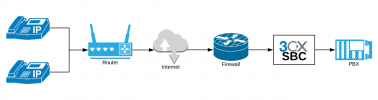
Can I create a Public SBC so that I can send preconfigured IP Phones out and have them provision (see image below)? I would prefer to not have to send an SBC out with every desk phone.
[snip graphic...]
I am aware this would be for a Self-Hosted or On-Prem instance, but there is virtually no documentation regarding this.
Most of the rent-a-sip-phone companies are using enterprise grade SBCs in their networks which is not cost effective for lots of folks and for 3CX would require custom Templates which I do all the time, but it is not for everyone. I know you think this SBC thing is crazy to have to support this.
What you are asking can be done but is requires custom non-supported config of 3CX. I have this cloud solution you are looking for on an Enterprise Grade SBC (in the USA) but you lose some 3CX Features, its non-standard and you have the custom Templates thing. Then you have to deal with the NATing and opening of ports -- it can be a mess. Also, Hosted 3CX presently does NOT allow custom templates BTW.
The SBC also allows you to see new handsets as when the telephone boots it broadcasts a packet on the LAN which is picked-up by the SBC then you can do easy one click provisioning. Since, all the VoIP traffic is tunneled and encrypted what is NOT to like.
There is no documentation for non-3CX SBC because 3CX wants you to use their SBC which greatly simplifies support. When I started with 3CX, before the 3CX SBC arrived many years ago, Enterprise SBCs were expensive so 3CX wrote their own custom one to fit their business model. The best-known SBC (well by me) is AudioCodes of course but there are others. I tried most of this idea and gave up!
What you may not beware, but the SBC also includes an encrypted tunnel between the SBC and the 3CX thus no ports have to be open NAT inbound as long as Port 443, 5001 for config of the SBC and 5090 are open outbound to the 3CX. Then the phone points to the SBC on the LAN. This is not that hard to manage.
Now if you are doing new project, I just did an evaluation project with a new client with Yealink T54Ws as a Router Phone and it works a treat for small customers with a handful or one phone at one location.
I have been using 3CX SBC for years first on a Windows PC, then on a Raspberry PI, then as a Windows VM Guest on a Windows Hyper-V Host, and now as a Linux VM Guest on Windows Hyper-V Host it all works out of the box.
You can't get much lower cost than a Raspberry PI and they are now available once again which was a big problem for the last few years due to the chip shortage. Now PI 5 is generally available and its very fast! The super small form factor Intel N Series PCs are getting lower in cost as well if you don't want a PI.
I personally think 3CX solution is great for small businesses, if you have lots of phones, then I recognize you do need more CPU horsepower for the SBC. While the Router Phone is a great solution it can't manage lots of Telephones. You can place the SBC on-premises in the form of a PI or Intel NUC like device (now ASUS) if you want running Linux.
Finally, the 3CX SBC is a bandwidth saver as many folks forget that it will adjust the audio stream to bypass the 3CX and be phone-to-phone assuming you are NOT recording the phone call. A real plus!