Creating whatsapp backup and Monitoring chats as manager

Status
Not open for further replies.

amahbub

Customer
Joined
Dec 11, 2022
Messages
3
Reaction score
0
Hi! Is it possible to export the chat data that accumulates over time in whatsapp via the integration with 3CX? or perhaps is it possible to create a backup of the data so that in case of an accident we still can recover it?

Also, is it possible to see whatsapp conversations that occur between agents and customers who are messaging to ensure that we are maintaining service quality and that agents are being diligent at work? I am unable to find any option for this as of now, once an agent accepts a conversation it seems to be only between them.

Thanks in advance!
 
Regarding your question, all chats within the system can be seen as logs within the management console.

1671054385525.png

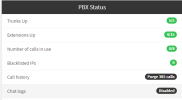
To achieve this, enable chat logs from the Dashboard > PBX Status section > Chat logs if disabled

1671054526186.png
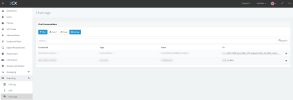
Then once enabled, head over to the Reporting section on the left, then Chat logs.

All the chat logs will be available here for any type of chat, whether it was an internal chat WhatsApp, Live chat, or SMS.

You can also export all the chat logs to a CSV file.
 
  • Like
Reactions: amahbub
Thanks a lot for the quick reply! This is perfect with regards to the chat backup function i was looking for.

However, when it comes to seeing whatsapp conversations that occur between agents and customers for the purposes of monitoring for quality assurance, I was wondering if there is an easier work around? for example, I want to monitor agent A's current taken whatsapp messages -- how many messages he replied to, how many he has still left pending without response, etc. Is there an easier way to do this is other than having to export logs to CSV and applying manual filters in excel?

Thanks in advance
 
There are also reports that you can run. These reports can be run on particular channels like WhatsApp, live chat, and SMS, but the WhatsApp chat would need to be directed to a call queue where your agents are members and answer messages from the queue,

To report upon messages, though, they would need to be taken and set to 'dealt with' by the agent answering them from the call queue for them to be reported upon.
 
  • Like
Reactions: amahbub
There are also reports that you can run. These reports can be run on particular channels like WhatsApp, live chat, and SMS, but the WhatsApp chat would need to be directed to a call queue where your agents are members and answer messages from the queue,

To report upon messages, though, they would need to be taken and set to 'dealt with' by the agent answering them from the call queue for them to be reported upon.
yes that sounds like exactly what i need. The whatsapp chat messages are already being directed to a queue so I am already doing that. Could you please refer me to some documentation that explains more about these reports and how i can run them?
 
Could you please refer me to some documentation that explains more about these reports and how i can run them?
I would like to know this too
 
You scared of losing your chats because of backup or ban by whatsapp, I have a smart idea you can get a second whatsapp for businesses. Get sms verification for whatsapp and connect your business
 
yes that sounds like exactly what i need. The whatsapp chat messages are already being directed to a queue so I am already doing that. Could you please refer me to some documentation that explains more about these reports and how i can run them?
You can run the reports from the management console > Reporting> reports section.

  • Press Add > scroll to the bottom of the list of reports.
  • Choose the required report > add the details, Name, and email the report should be sent to
  • Choose the frequency to run the report for, or One time now, if needing to only run the report one time.
  • Choose the channel to run the report from the channels drop-down menu, WhatsApp, for example.
  • Choose the date range to run the report for
  • Choose the queue from the Add Queues button.
  • Pres Schedule Report from the top of the page
This will run the report based on the criteria you have chosen above.
 
Last edited:
We use the CRM Integration to log each Whatsapp chat after it's being closed by an agent.

There is (at least) one problem with this solution.
The log is only being sent to the CRM system if it is an existing customers.
So, when the 3CX CRM integration checks if the customers exists, I return an always "true" vaue.

At the CRM system, the whatsapp chats are linked by telephone number.

Hope this helps.
 
Status
Not open for further replies.

Members Online Now

Forum statistics

Threads
111,835
Messages
589,289
Members
164,665
Latest member
dominik.pepel