CRM contact lookup does not work, but calls are logged

Status
Not open for further replies.

Pille

Customer
Joined
Feb 23, 2021
Messages
10
Reaction score
0
Hi!
Our calls are logged correctly in CRM but in case of an incoming call, the expected contact lookup that should open a new CRM tab with the contact does not open up.
This way direct notes regarding the call purpose etc. are not possible.

Is there another place to configure this?

Thx!
 
  • Like
Reactions: edossantos
In addition, ensure that the Web Client / Desktop App > Settings > Integration, is configured to automatically launch the contact record when matched.
 
  • Like
Reactions: TheodorosG_3CX
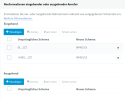
I've deactivated all pop-up blocker and have set the following formatting rules in our sip trunk:

1664464977138.png

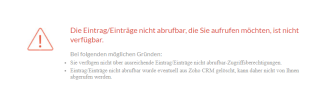
But now an incoming call opens the following CRM page and the call is not logged correctly anymore:
1664465027317.png
 
Can you please let us know if you use any custom pop-up url in the web client integration?
 
  • Like
Reactions: edossantos
Good morning!
There is no custom url in the web client integration, but it works again now.
It seems that it did not work as I have activated the Zoho Desk integration, as I thought in addition, but obviously it only works with one or the other. Now Zoho CRM is integrated again and it works.

But I noticed the contact lookup only works if I set the lookup to match min. 6 digits (could probably be more), it does not work if I set it to "match exactly". But that's fine for me.

Now I'm wondering if it is expected behaviour that only the contact pops up, but not the call log field to take notes during the call and add them to the description, for example. The way it works now, an agent has to take notes somewhere else during the call (eg in the contact) and either add them after the call to the respective call log or leave them as a general note.
Is that the way it's intended to work, or is there an option to open the call log directly?
 
But I noticed the contact lookup only works if I set the lookup to match min. 6 digits (could probably be more), it does not work if I set it to "match exactly". But that's fine for me.
This will depend on how you store contacts numbers in the CRM. 3CX queries using the numbers you specify.

Now I'm wondering if it is expected behaviour that only the contact pops up, but not the call log field to take notes during the call and add them to the description, for example. The way it works now, an agent has to take notes somewhere else during the call (eg in the contact) and either add them after the call to the respective call log or leave them as a general note.
Is that the way it's intended to work, or is there an option to open the call log directly?
Yes, this is how it works. We can only create the call log when the call ends, as that's when we have all the details of the call (start time, end time, duration, etc.).
 
Status
Not open for further replies.

Members Online Now

Forum statistics

Threads
111,843
Messages
589,326
Members
164,679
Latest member
SamadMYK