CRM Contact URL Not Popping Up

Status
Not open for further replies.

paoloLac

Free User
Joined
Jan 22, 2021
Messages
51
Reaction score
8
Hi,

We have 2 issues. Custom Integration template has been working for v16 but got issues on v18.

1. Contact URL is not popping up. We are outputting the ContactURL, FirstName, LastName and PhoneBusiness as per the documentation. Actions:
  • When doing a test call, if no contact exist, it's able to create the contact in 3cx as well as the CRM but no popup. Checked the logs and can see that the lookup is able to return a match from the CRM.
  • On the 2nd test call (contact already exists), we updated the contact name in the CRM and did a test call. 3cx was able to return results and update the 3cx contact but still no popup.
  • Run test via the `Test` option when uploading the template. It goes through successfully and the test log shows that there is a contactURL being created with the correct format.
2. EntityId being passed as empty string. The value for this attribute is being set on the outputs of the chained scenario.

I don't seem to see what the issue is and have been going through the logs several times.

Plan: Enterprise
3CX version: 18.0 (Build 965)
Number of TrunkLines: 2
IVR: Yes
3CX Phone: WebClient (Chrome Extension)
Automatically open contact URL when CRM integration is enabled: On

XML:
<Scenario Id="" Type="REST">
    <Request Url="[APIDomain]/phone-contacts?q=[Number]" MessagePasses="0" RequestEncoding="UrlEncoded" RequestType="Get" ResponseType="Json"/>
    <Rules>
      <Rule Type="Any">result.contact._id</Rule>
    </Rules>
    <Variables>
      <Variable Name="Id" Path="result.contact._id">
        <Filter />
      </Variable>
      <Variable Name="FirstName" Path="result.contact.first_name">
        <Filter />
      </Variable>
      <Variable Name="LastName" Path="result.contact.last_name">
        <Filter />
      </Variable>
      <Variable Name="PhoneBusiness" Path="result.contact.phone">
        <Filter />
      </Variable>
    </Variables>
    <Outputs Next="CreateEngagement"/>
  </Scenario>
  <Scenario Id="CreateEngagement" Type="REST">
    <Request SkipIf="[ReportCallEnabled]!=True" Url="[APIDomain]/phone-contacts/engagements/create" MessagePasses="0" RequestEncoding="Json" RequestType="Post" ResponseType="Json">
      <PostValues>
        <Value Key="contact_id" Passes="2" Type="String">[[Id]]</Value>
        <Value Key="customer_id" Passes="0" Type="String"></Value>
        <Value Key="transaction_id" Passes="0" Type="String"></Value>
        <Value Key="engagement_type" Passes="2" Type="String">[[CallType]]</Value>
        <Value Key="call_direction" Passes="2" Type="String">[[CallDirection]]</Value>
        <Value Key="phone_number" Passes="1" Type="String">[Number]</Value>
        <Value Key="agent" Passes="1" Type="String">[Agent]</Value>
        <Value Key="agent_id" Passes="0" Type="String"></Value>
        <Value Key="customer_number" Passes="1" Type="String">[Number]</Value>
        <Value Key="status" Passes="0" Type="String">in-progress</Value>
        <Value Key="provider" Passes="1" Type="String">3CX</Value>
        <Value Key="duration" Passes="0" Type="String"></Value>
        <Value Key="body" Passes="0" Type="String"></Value>
      </PostValues>
    </Request>
    <Rules>
      <Rule Type="Any">data._id</Rule>
    </Rules>
    <Variables>
      <Variable Name="EngagementId" Path="data._id">
          <Filter/>
      </Variable>
      <Variable Name="TransactionId" Path="data.transaction_id">
          <Filter/>
      </Variable>
    </Variables>
    <Outputs AllowEmpty="false">
      <Output Type="EngagementId" Passes="2" Value="[[EngagementId]]"/>
      <Output Type="TransactionId" Passes="2" Value="[[TransactionId]]"/>
      <Output Type="ContactId" Passes="1" Value="[Id]" />
      <Output Type="FirstName" Passes="1" Value="[FirstName]" />
      <Output Type="LastName" Passes="1" Value="[LastName]" />
      <Output Type="PhoneBusiness" Passes="1" Value="[Number]" />
      <Output Type="DisplayName" Passes="1" Value="[FirstName] [LastName]" />
      <Output Type="EntityId" Passes="2" Value="[[Id]]:[[TransactionId]]:[[EngagementId]]"/>
      <Output Type="ContactUrl" Passes="1" Value="https://[Domain]/phone-systems/contacts?q=[Number]&amp;contact_id=[Id]"/>
    </Outputs>
  </Scenario>
  <Scenario Id="ReportCall" Type="REST">
    <Request SkipIf="[ReportCallEnabled]!=True" Url="[APIDomain]/phone-contacts/engagements/update" MessagePasses="0" RequestContentType="application/json" RequestEncoding="Json" RequestType="Post" ResponseType="Json">
      <PostValues>
        <Value Key="engagement_type" Passes="2" Type="String">[[CallType]]</Value>
        <Value Key="call_direction" Passes="2" Type="String">[[CallDirection]]</Value>
        <Value Key="phone_number" Passes="1" Type="String">[Number]</Value>
        <Value Key="agent" Passes="1" Type="String">[Agent]</Value>
        <Value Key="customer_number" Passes="1" Type="String">[Number]</Value>
        <Value Key="status" If="[CallType]==Inbound" Passes="2" Type="String">completed</Value>
        <Value Key="status" If="[CallType]==Missed" Passes="2" Type="String">[[CallType]]</Value>
        <Value Key="status" If="[CallType]==Outbound" Passes="2" Type="String">completed</Value>
        <Value Key="status" If="[CallType]==Notanswered" Passes="2" Type="String">abandoned</Value>
        <Value Key="provider" Passes="1" Type="String">3CX</Value>
        <Value Key="duration" Passes="1" Type="String">[Duration]</Value>
        <Value Key="body" If="[CallType]==Inbound" Passes="2" Type="String">[[InboundCallText]]</Value>
        <Value Key="body" If="[CallType]==Missed" Passes="2" Type="String">[[MissedCallText]]</Value>
        <Value Key="body" If="[CallType]==Outbound" Passes="2" Type="String">[[OutboundCallText]]</Value>
        <Value Key="body" If="[CallType]==Notanswered" Passes="2" Type="String">[[NotAnsweredOutboundCallText]]</Value>
        <Value Key="from_pbx" Passes="1" Type="Boolean">True</Value>
        <Value Key="transaction_data" Passes="0" Type="String">[EntityId]</Value>
      </PostValues>
    </Request>
    <Variables/>
    <Outputs/>
  </Scenario>

Any help would be much appreciated.

Thanks in advance.
 
You need to ensure that the incoming caller id is matching the number also in the CRM. If there is no match there will be no pop-up.
Also under Advanced<<Contacts<<Options set to match exactly and check the systemservice log file
 
Thanks @theodorosg!

I'll look into the logs and try it out.. Right now setting for Advanced<<Contacts<<Options is match 8 numbers at least.

I'll get back here with updates.
 
Hi again,

I switch the r Advanced<<Contacts<<Options to Match Exactly. I checked the logs and can see this CRM: No matchings found. . This is usually after getting the response from call reporting and lookup. Does this mean it does not find any match and may be the reason why the popup is not rendering?

Just confused as the lookup request to the CRM is able to get a match result.

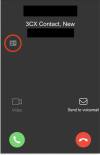
When the call is received, on the extension, it shows the contact card.

Screen Shot 2022-08-05 at 1.26.17 PM.png

In case there will be an error in the call reporting, will this hinder 3cx from opening the popup?

Thanks
 
Last edited:
When there is an inbound call the PBX will send the number to the CRM and make the contact lookup. If the CRM does send any result(No matching Found) there will be no pop-up.
So you probably need to check the number that is send to the CRM is matched, otherwise it will not work.
Now you have the screenshot that shows a CRM contact but you don't have a pop-up, have you checked for any duplicated contacts in the 3CX phonebook?
 
Thanks @theodorosg . Yes, I actually deleted all contacts in 3cx, then restarted the system server to try to delete cache. Though we have an IVR setup. I don't know if that affects the integration. But I routed all calls to my extension o be sure I receive it.

What I tried as well was delete all contacts in 3cx but the caller number I am using exists in the CRM. When I call the trunkline, 3cx is able to create the contact in 3cx with the details of the match contact in the CRM. But no popup. Not sure what I may be missing.

One other thing is that we don't set an Entity and EntityOrder in the <Parameters> element. We just set the EntityId in the output. Apologies but I have been trying to resolve this for a week already but to no avail. Resolving this would be awesome. We have clients waiting for this feature.

Any additional advise would be much appreciated.
 
Thanks @theodorosg . I read the thread and it similar to our issue. I'll try the suggested answers. But will this probably the same cause why 3cx is not rendering the contactUrl?
 
It is possible
 
Thanks @theodorosg . I'll make some changes and keep you posted on this thread.
 
  • Like
Reactions: TheodorosG_3CX
Hi @theodorosg . I added EntityType in the outputs and call reporting seems to be populating the EntityId now. So issue 2 is resolved. But still having issues with the contactUrl popup. I deleted all contacts, restarted 3CX PhoneSystem 01 System Server and tested but no luck with the popup. I checked the logs and everything seems to be working. Outputs are pushing through as well as calls to the CRM API. Taking into account that the contact card is also appearing on the 3cx Chrome Phone extension.

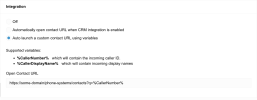
One other thing to note, I tried using the Auto launch a custom contact URL using variables option in the extension setting but this seems to be not working as well. No popup being rendered.

Screen Shot 2022-08-09 at 12.50.17 PM.png

So I am not sure what I am doing wrong here.

Lastly, I have my personal and work email Chrome Browser profiles open. Does this make any impact for the extension to know where to open the contact url?

Any help would be much appreciated.

Thanks
 
Good news for the one issue, glad to hear it.
Now as for the pop up, the profile will not make any difference here as actually the url will be passed to the browser. In case you have any ad-block or related addon you need to remove it.
The pop-up depends on whether there is any match returned from the CRM side and there is no need to enable custom url since the CRM is configured in the PBX side. I would suggest that you set the PBX in verbose, make the test and check the systemservice log which has all the information regarding the contact lookup.
 
  • Like
Reactions: Evolute IT
Thanks @theodorosg . The verbose logging is already enabled when I started testing the integration. I see in the logs the CRM calls return find and variables are being set correctly. As you can see, 3cx is able to register a contact card (card icon) on the 3cx phone extension when there is an incoming call. So I assume that 3cx is able to capture the contactUrl. What I can't understand is why the popup is not showing. Below are already the actions I have taken:

  1. Deleted All Contacts in 3cx
  2. Restarted SystemServer Service
  3. Set the Number Length to 8 in Advanced >> Contacts >> Options
  4. Output EntityId and EntityType in the template
  5. Checked 3cx extension settings in Chrome. Redirects and Popups are enabled for this extension
  6. Route all calls to my extension (Office and Out of Office hrs)
With regards to Auto launch a custom contact URL using variables, I just tried using this to see if 3cx extension will be able to open the url in the browser. I expected that it should as it does not depend in the CRM integration and 3cx will just open the custom URL . But unfortunately it doesn't :( .

I am running out of options and just want to get this resolved. I can send you the logs if possible (my last resort).

Any other insights?

I really appreciate all the help and patience.
 
Have you checked this with a different browser(Edge for example)?
 
I haven't. I'll try it out. Do I need to install an extension as well for edge? I'll also try it out maybe on FF.
 
You only have to access the 3CX Web Client with an extension and receive the call for the contact lookup to trigger. Also use the latest 3CX Desktop App and check.
 
Hi @TheodorosG_3CX ,

Good day. Apologies for the late update here as we have tried to reach out to our 3CX partners to try to resolve this issue. So here are my updates:

  1. We tried to reach out to our 3CX partner but we haven't got good support.
  2. We purchased a support ticket ($75) and sent the ZIP file. We got a response that Support can only assist with supported CRM integrations. :( and only shared links for CRM integration and XML description.
  3. So we tried to troubleshoot on our side but still couldn't find what the issue why the CRM browser popup is not showing.
We checked the logs (verbose) and can see that all API requests to our CRM are returning responses and 3cx is able to

  • Capture the variables
  • Set the outputs
  • Lookup, CreateContact and ReportCall scenarios are working.
The functionality is working above and the only thing that is an issue is the CRM Contact URL popup. I checked my browser settings and enabled popups as well as made sure that the WebClient integration setting is set to Automatically open contact URL when CRM integration is enabled

We are stuck in this for a month now and really want to get this resolved. We have clients waiting for this feature.

Thanks in advance.
 
DM me your template. I'll take a look.
 
Hi! Uhm, sorry I might be stupid on this but how to I DM here?
Upload the file to GDrive or something and send me the link by clicking my username, then "Start Conversation".
 
Status
Not open for further replies.

Forum statistics

Threads
112,322
Messages
591,889
Members
165,470
Latest member
Robert Lee