CRM Integration / Contacts "Match exactly"

Status
Not open for further replies.

Lynceus

Customer
Joined
Jan 24, 2022
Messages
7
Reaction score
0
Hello,
I am currently working on the 3CX / Salesforce integration. I am stuck at 3CX CRM Server Side Configuration.

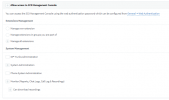
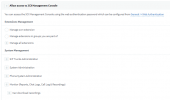
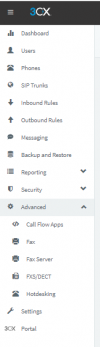
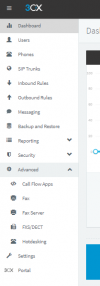
Indeed, I have to do this manipulation. The problem is that I don't have "Contacts" in my Management Console. Not in Advanced, not anywhere else.

⚠ Important: In 3CX Management Console, open "Advanced" > "Contacts" > "Options", set the matching strategy to "Match exactly" and click "OK" to save.

Do you know what I missed? Or where I can find it?

Thanks for your help
1643022591405.png
 
Version - Standard Pro Enterprise?
 
Hello, I have a "Professional Annual" licence. Can't find any other information in the interface
 
Users ->User>Rights->System Management - check all
 
Users ->User>Rights->System Management - check all
Thank you
Do you know why I can't access to this part? I connected to the Management Console using the web authentication password. 1643025868032.png
 
If you're not the main admin, or have the necessary rights, it won't show up.
 
  • Like
Reactions: edossantos
Hello,
I now have the necessary right. But "Contact" is still missing in "Advanced".
Do you have any idea?
Thank you for your help

1643045517808.png


1643045549508.png
 
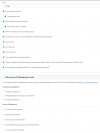
Try enabling "Can Manage Company Phonebook" under the Rights tab.
 
This is now done but Contacts is still missing...

1643051302318.png
 
Try enabling "Can Manage Company Phonebook" under the Rights tab.
Hello, I finally managed to check the field 'match exactly' and to finish the integration.
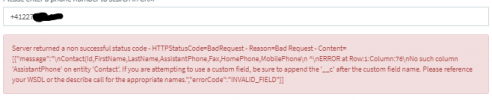
I am now here and I'm trying to test the connection between 3CX and Salesforce but I have this error message...
May I ask you to help please?
Thank you

1643634141904.png

1643634108969.png
 
Hello, I finally managed to check the field 'match exactly' and to finish the integration.
I am now here and I'm trying to test the connection between 3CX and Salesforce but I have this error message...
May I ask you to help please?
Thank you

View attachment 27519

View attachment 27518
You need to make those fields visible in Salesforce settings. In order to do this change:
- Go to “Setup Home > Objects and Fields > Object Manager > Contact > Fields.”
- Click on the field that you want to make visible, for example “AssistantPhone”.
- Press the “View Field Accessibility” button on the upper right side of the screen.
- Click on the “Hidden” label on the right of “Standard User”.
- Under the “Field-Level Security” check the “Visible” option.
- Repeat the procedure for any other missing field.
 
  • Like
Reactions: Evolute IT
You need to make those fields visible in Salesforce settings. In order to do this change:
- Go to “Setup Home > Objects and Fields > Object Manager > Contact > Fields.”
- Click on the field that you want to make visible, for example “AssistantPhone”.
- Press the “View Field Accessibility” button on the upper right side of the screen.
- Click on the “Hidden” label on the right of “Standard User”.
- Under the “Field-Level Security” check the “Visible” option.
- Repeat the procedure for any other missing field.
Thank you, this is done. Actually all the needed fields where already visible.

We tried to log a call via 3CX but this is not field into Salesforce.

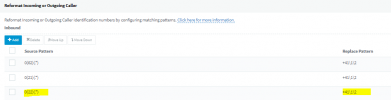
Here are the parameters in 3CX.
1644226248572.png

Here are the tests:
1. My sales called using 022 format
2. Client called and we got the +41 format
1644226340183.png

But nothing in Salesforce...
1644226404066.png
Can you advise here please?
Thank you for your help
 
Hello,

Have you find an issue? I have the same problem.

Best regards
Thank you for your help
 
Status
Not open for further replies.

Latest Posts

Forum statistics

Threads
112,323
Messages
591,896
Members
165,473
Latest member
NathanMitchell