CRM Integration doesn't open ContactUrl automatically

Status
Not open for further replies.

startechinformatica

Silver Partner
Basic Certified
Joined
Jun 9, 2020
Messages
5
Reaction score
0
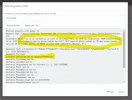
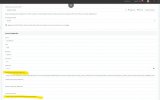
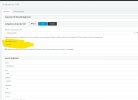
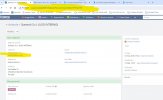
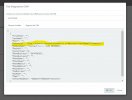
Good morning everyone, I encountered a problem with CRM integration via database query (see attached images).

Let me try to explain: once I receive the call on 3CX, the query is successful and finds the record in the CRM database (EspoCRM), correctly populates the ContactID field with the right value, correctly composes the ContactUrl link (which if I copy on a browser points exactly to the customer's record on CRM), but it does NOT open it anymore automatically (until some time ago it did...)!!!

What am I doing wrong? What am I missing to check?

Thank you in advance, have a good evening everyone.
 

Attachments

  • Immagine 2024-05-23 161136.jpg
    Immagine 2024-05-23 161136.jpg
    83 KB · Views: 47
  • Immagine 2024-05-23 161221.jpg
    Immagine 2024-05-23 161221.jpg
    125 KB · Views: 43
  • Immagine 2024-05-23 161317.jpg
    Immagine 2024-05-23 161317.jpg
    170.1 KB · Views: 34
  • Immagine 2024-05-23 161411.jpg
    Immagine 2024-05-23 161411.jpg
    124.3 KB · Views: 32
  • Immagine 2024-05-23 161520.jpg
    Immagine 2024-05-23 161520.jpg
    173.4 KB · Views: 42
We thought about it and tested in incognito mode, but in our case with 3CX v20, it makes no difference... :(
Are you using the Desktop App? You should use the Web Client in the browser. If you're still getting the issue related to the license, you should open a support ticket and check it with them.
 
Are you using the Desktop App? You should use the Web Client in the browser. If you're still getting the issue related to the license, you should open a support ticket and check it with them.
As I mentioned above, we tested the DesktopApp AND the webclient (including PWA).

On the Enterprise install, it works on the DesktopApp AND on the webclient.

On the Pro license install, it works neither on the DesktopApp nor on the webclient.

And all the settings, both on the 3CX side and on the PC side (popup authorization, Chrome version, etc.) are identical...
 
As I mentioned above, we tested the DesktopApp AND the webclient (including PWA).

On the Enterprise install, it works on the DesktopApp AND on the webclient.

On the Pro license install, it works neither on the DesktopApp nor on the webclient.

And all the settings, both on the 3CX side and on the PC side (popup authorization, Chrome version, etc.) are identical...
Just tested a Pro license on v20. It works. Not sure what is wrong on that system but something is for sure.
 
As I mentioned above, we tested the DesktopApp AND the webclient (including PWA).

On the Enterprise install, it works on the DesktopApp AND on the webclient.

On the Pro license install, it works neither on the DesktopApp nor on the webclient.

And all the settings, both on the 3CX side and on the PC side (popup authorization, Chrome version, etc.) are identical...
I would recommend you to open a support ticket with 3CX, so they can check this in more detail and let you know what's wrong.
 
Same problem pop up again.
Or, the CRM page do not pop-up anymore.
I have check hundreds of time:
- V20 update 2, Pro license
- database Mysql integration Type (v 8.0)
- both 3cx and Mysql on the same windows machine
- on the administration console the test button works fine, show a url that I have check accurately
- on the user side the option "Open Contact URL using Server Side CRM integration
- a CRM contact is automatically created in the phonebook
- I have checked both PWA and web client, with pop-up enabled, cache completely cleaned

BUT no page is open at clients side

I checked on the crm log, and no http request is made

Any help will be appreciated
 
Same problem pop up again.
Or, the CRM page do not pop-up anymore.
I have check hundreds of time:
- V20 update 2, Pro license
- database Mysql integration Type (v 8.0)
- both 3cx and Mysql on the same windows machine
- on the administration console the test button works fine, show a url that I have check accurately
- on the user side the option "Open Contact URL using Server Side CRM integration
- a CRM contact is automatically created in the phonebook
- I have checked both PWA and web client, with pop-up enabled, cache completely cleaned

BUT no page is open at clients side

I checked on the crm log, and no http request is made

Any help will be appreciated
How are you configuring your Web Client > Settings > Integration? Ensure that you're setting it to use the server side integration.
 
How are you configuring your Web Client > Settings > Integration? Ensure that you're setting it to use the server side integration.
Yes, it is configured this way.
Any other can confirm whether it is necessary an enterprise license ?
I have contacted 3CX but they do dot answer to question about their own product
 
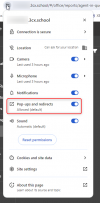
I can confirm that CRM integrations are available in Professional edition. So Enterprise edition is not required for this. If the CRM contact is added to the phone book, that means that the lookup is working. If you don't see the popup, most probably it's something with the browser. Try from an incognito window, ensure that you enable notifications, microphone and speaker. Or try clearing cache and browsing data from your existing browser.
 
Also ensure that you have this option allowed on your browser.

1722340260455.png

You may need to reset your permissions
 
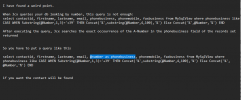
I have found a weird point.

When 3cx queries your db looking by number, this query is not enough:
select contactid, firstname, lastname, email, phonebusiness, phonemobile, faxbusiness from myview
 
I have found a weird point.

When 3cx queries your db looking by number, this query is not enough
Matching strategy

V18: Advanced > Contacts > Options
V20: Admin > System > Phonebook > Options
 
Matching strategy

V18: Advanced > Contacts > Options
V20: Admin > System > Phonebook > Options
Sorry, the forum do not accept all, see attached image
 

Attachments

  • Screenshot 2024-08-05 171458.png
    Screenshot 2024-08-05 171458.png
    27.6 KB · Views: 11
Sorry, the forum do not accept all, see attached image
This is specific to your database probably or your query. We use DB queries often and never had to do this.
 
Matching strategy

V18: Advanced > Contacts > Options
V20: Admin > System > Phonebook > Options
You suggestion is important; thank you
 
  • Like
Reactions: Evolute IT
Status
Not open for further replies.