CRM Integration not displaying/ opening CRM in a browser

Status
Not open for further replies.

paoloLac

Free User
Joined
Jan 22, 2021
Messages
51
Reaction score
8
Hi,

I am trying to integrate our CRM with 3CX. I was able to build the XML template and tested in management console. So far, I see Search Result and CRM log tabs, and the test was successful. So I click OK and I am redirected back to the Settings view. I then try to do an inbound call. I was expecting for our CRM page to open in a browser but nothing is happening. Am I missing anything?

In my WebClient >> Integrations, what is set is Automatically open Contact URL when CRM Integration is Enabled and I was expecting that once you have added a template in the Server Side integration, this should be all set.

Any insights would be much appreciated. Thanks!
 
Do you see the contact being added to 3CX Contacts?

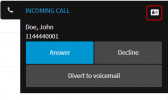
When you receive the call on the Web Client, do you see the contact card icon on the upper right corner?
1611326082384.png
 
Hi Ernesto,

Thanks for the reply. I see a different view for I am using the Chrome extension. I do see a CRM icon in the created contacts that I can click and will redirect to the ContactURL. But What we would like to happen is when there is an incoming call, the CRM will be open in a browser and the agent does not have to click on anything else. I can make this happen if I manually set our contact url using the Automatically launch contact URL using variables option. I had the understanding that once you added a template in the CRM Integration, when 3CX queries the API and finds a match, it will automatically open the Contact URL that is set in the template?

Screen Shot 2021-01-22 at 10.52.52 PM.png
 
OK; so the contact is being found. The Web Client or Chrome Extension should automatically launch this Contact URL when your extension rings. If this is not happening, please check if the browser is blocking popups.
 
OK; so the contact is being found. The Web Client or Chrome Extension should automatically launch this Contact URL when your extension rings. If this is not happening, please check if the browser is blocking popups.
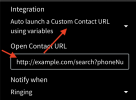
Thanks, Ernesto. I have disabled pop-ups in chrome but still no browser being opened. If I set a custom Contact URL in the Chrome Extension under Settings >> Integration and choose Auto launch contact URL using variables, then the browser pops-up. But if I choose Automatically open ContactURL when CRM Integration is enabled, then nothing happens.

Screen Shot 2021-01-23 at 12.17.03 AM.png
 
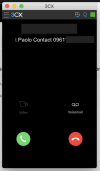
Can you show me a screenshot of what you see in the Chrome Extension when you receive an inbound call?
 
Can you show me a screenshot of what you see in the Chrome Extension when you receive an inbound call?
Sure. Please see below. Had to cover my number. Oh, please note that I have a PRO Trial version. Not sure if that makes any difference. Thanks

Screen Shot 2021-01-23 at 12.25.25 AM.png
 
The contact card is not being shown. That means that the contact matched is not a CRM contact. Probably you have another contact in the global phonebook matching this number. In that case, that contact is being taken. You need to delete non-CRM contacts from 3CX Contacts.
 
Thanks Ernesto, I think that make sense. I have a contact that I created in 3CX manually. I tried using a different number and the popup showed. However, it's not consistent, sometimes when I call the trunk line, I get the call and sometimes it doesn't? I have to try several times or reload the extension to make it work.
 
Do you mean that you have problems receiving the call? Or with the popup?
 
I think the popup is okay now but I haven't tried using other numbers yet. The other issue is that sometimes I am receiving the call and sometimes not. But I noticed if I change the Contact Options Match Caller ID to a contact entry No Match, then receiving calls is consistent. So what is weird is that for example, I set the Match Caller ID to match at least 7 chars, I call the trunk and I receive the call. Then I try to call the trunk again using the same number, I don't get the call. Hope that make sense. This is my first time setting up 3CX and I am not sure of the logic of the Match Caller ID options. Thanks in advance.
 
If you're having problems receiving calls, you should ask the question in the General forum.
 
If you're having problems receiving calls, you should ask the question in the General forum.
Thanks, Ernesto. I was able to figure out what was causing the issue receiving calls. It was due to the firewall and had to run checks. Popup seems to be working now as well. I have another issue (posting call journal info) but will post this on a separate thread. Thanks for all the help on this issue!
 
  • Like
Reactions: edossantos
Status
Not open for further replies.

Latest Posts

Forum statistics

Threads
112,324
Messages
591,897
Members
165,475
Latest member
lastshadow