CRM integration not work after today update

coopcsc

SOHO User
Joined
Dec 30, 2011
Messages
27
Reaction score
1
Hi,
after today 3CX update to Version 20.0 Update 6 (Build 724 Release), our CRM integration with Freshdesk stop to works.
I developed integration creating a correct template and it works since yesterday.
I tried to get informations about errors from 3cxSystemServive.log but nothing compare. No onw call to Freshdesk API is present.

Can you help me?
 
Hi @coopcsc please note that you have to use the default template and configure the crm as mentioned in this document.

Once you have set your settings with the default template, then click on the TEST button and enter an existing contact number, the contact look up should return the contact details.

As first step validate the information above and make sure it is set correctly with the default template and not a custom one.
 
Hello @coopcsc,

Can you please confirm what template was/is in use? The default Freshdesk or something custom generated?

Best,
KS.
 
Hi Kyriacos,
I use a custom template and since the update it works.
The default template seams to work.
Now I am scrolling the difference to search the problems that the update has generate.
Do you know that's the changes about this functionality in the last 3CX update?
Regards
 
To clarify, you are using customized template for Freshdesk?
If so, with the default template you still have issues?
 
Yes, I use a custom template for freshdesk.
The default template works with test function but my custom template now (only now) not works.
 
Can I send you my custom template?
 
I notice that I removed the id="" scenario. This scenario is used by the test functionality.
I added it and now test functionality works. But query to CRM not works.
I attached my custom template removing sensible data.
 

Attachments

Why are you using a custom template if you have an officially supported one?
 
Exactly, the template is there, tested and verified, is there a specific reason to use a custom template?
 
I need a custom template because I need to add specific conditions and custom fields of Freshdesk that need to be compiled.
After the 3CX update I can read integration errors and problems in 3CX log. But now no one line of error is writed in log.
How I can debug my integration now?
 
Hi,
I find the problem about the update of 3CX.

In template code
<Number Prefix="AsIs" MaxLength="[MaxLength]" />
the param [MaxLength] is set to 6. Before update this param is full number lenght. I solved setting that to 15.

The variable QueueExtension seams that is not readed. Before update this variable is readable. I cannot solve this.

Call journaling not call Scenario Id="ReportCall" but call Scenario Id="".

Because call journaling not call the correct scenario i think that all the necessary variables are not passed. In fact the variable
[CallType], [CallDirection] and [QueueExtension] are empty.

Please correct the problem in the update because we have a great problem with our CRM service due to it.
I am disponible to help you and to do other tests.

Regards.
 
Last edited:
Hi,
I find the problem about the update of 3CX.

In template code
<Number Prefix="AsIs" MaxLength="[MaxLength]" />
the param [MaxLength] is set to 6. Before update this param is full number lenght. I solved setting that to 15.

The variable QueueExtension seams that is not readed. Before update this variable is readable. I cannot solve this.

Call journaling not call Scenario Id="ReportCall" but call Scenario Id="".

Because call journaling not call the correct scenario i think that all the necessary variables are not passed. In fact the variable
[CallType], [CallDirection] and [QueueExtension] are empty.

Please correct the problem in the update because we have a great problem with our CRM service due to it.
I am disponible to help you and to do other tests.

Regards.
You're using it wrong.

Id="" is for lookup. ReportCall is definitely the journaling. That's why some variables are empty when you try to use it.

The MaxLength was always like this and this is set in the 3CX options. Also, 15 will probably cause issues with matching numbers.

I would recommend using the default template or hire someone to validate and test your custom one.
 
If you need to customize the template, start from the 3CX official template, and make your changes there. If it's just adding some fields during call journaling, you don't need to build a new template from scratch. Just add the parameters to the JSON body when you do the call journaling request.... Everything else can be left unchanged and working.
 
Hi,
I follow the official documentation and I made the customization that I needed.
I try to start again from default template. Is it downloadable somewhere if it is removed from our 3CX installation?
How I can <<add the parameters to the JSON body when you do the call journaling request>>?
 
I try to start again from default template. Is it downloadable somewhere if it is removed from our 3CX installation?
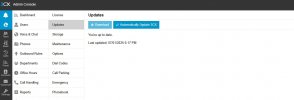
Yes, from System > Updates.

How I can <<add the parameters to the JSON body when you do the call journaling request>>?
Just edit the template with a text editor, and add the fields you need to the scenario. you will see the current JSON as part of the request in the ReportCall scenario, or one of the scenarios following this one.
 
  • Like
Reactions: Evolute IT
Hi,
I am sorry for the questions but I cannot find the settings that you have indicate.

System > Updates have not the possibility to download the templates (I attached a screenshot).
I cannot find le option for MaxLength. Has is indicated in https://www.3cx.com/community/threads/variable-maxlength-definition.121622/, I cannot find Console > Advanced > Contacts > Options in V20.
 

Attachments

  • Screenshot_3-7-2025_143119_coopcsc.3cx.it.jpeg
    Screenshot_3-7-2025_143119_coopcsc.3cx.it.jpeg
    40.1 KB · Views: 3
  • Like
Reactions: Evolute IT
I completed new tests.
I confirm you that after 3CX last update, after a call, the "ReportCall" scenario is not executed. Is executed the call Id="" scenario.
This is a bug in the 3CX software release.
We don't need to hire anyone. I am a developer and IT specialist.
 
I completed new tests.
I confirm you that after 3CX last update, after a call, the "ReportCall" scenario is not executed. Is executed the call Id="" scenario.
This is a bug in the 3CX software release.
We don't need to hire anyone. I am a developer and IT specialist.
Are you using the ReportCall on its own?

If so, it's not a bug. U6 now forces the EntityId/EntityType to be filled in order to trigger the ReportCall scenario. Otherwise it's just not triggering. When you set the ID to empty, it becomes a lookup scenario instead, thus why it is triggered. You could use a generic/dummy lookup scenario to return an output which would then force the ReportCall to work.