CRM Integration, Pop on Answer, not ring..

Status
Not open for further replies.

Tony Cave

Platinum Partner
Advanced Certified
Joined
Jun 8, 2017
Messages
110
Reaction score
44
Hi All,

Would appreciate the help of the 3CX hive mind on this one...

We have a customer who has built an integration with 3CX which works, however they have asked for the below options, can anyone tell me if its possible?

  1. When an incoming call is picked up by an agent, we need to be able to display a form to be filled in during the call. We are currently trying to use the CRM Contact Url for this, but the options don’t seem to allow it to be run on pickup rather than on ring. Is there a way to trigger a program, call an url or api on a call being picked up (rather than on ringing).
  2. When an outgoing call is made, we also need to be able to display the form. We currently want to use the same CRM contact URL for this, but this doesn’t allow a differentiator for incoming/outgoing calls. Is there a way for an external program to be able to register a call to be made/number to be rung, or a different way to register when an outgoing call is made (and who made the call). This being done on ringing is fine.
Any and all help is appreciated...
 
When an incoming call is picked up by an agent, we need to be able to display a form to be filled in during the call. We are currently trying to use the CRM Contact Url for this, but the options don’t seem to allow it to be run on pickup rather than on ring. Is there a way to trigger a program, call an url or api on a call being picked up (rather than on ringing).
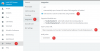
The only way to configure an URL to be launched on answer, is selecting the option "Auto launch a Custom Contact URL using variables" in the Web Client > Settings > Integration:
1596139673327.png

However, this is a static URL, which only has the contact number or contact name as variable parts. This is not the URL retrieved from the CRM through the template.

The Contact URL retrieved using the template can only be launched on ring.

When an outgoing call is made, we also need to be able to display the form. We currently want to use the same CRM contact URL for this, but this doesn’t allow a differentiator for incoming/outgoing calls. Is there a way for an external program to be able to register a call to be made/number to be rung, or a different way to register when an outgoing call is made (and who made the call). This being done on ringing is fine.
Unfortunately this is not possible, both popups only work for inbound calls.
 
  • Like
Reactions: Tony Cave
To accomplish everything your customer needs, a custom integration will be needed. Options for the web client are limited to what the template provides. However, a custom 3CX Phone for Windows plugin can do just about anything if that client is acceptable.

Alternatively, you can use our VoIPTools API to subscribe to 3CX events either server-side or client-side, and pop the needed custom screen. For example, we are about to release a new "3CX wrap-up codes" product that pops a screen on inbound and outbound where you can add notes and disposition the result of the call. This tool runs on the client-side, and installs a small application that runs in the lower right-hand icon tray. It is independent of any 3CX client, so you can use just a physical phone if you want.

Remember, anything we can do, you can do, since we use the same API we offer to the public.
 
The only way to configure an URL to be launched on answer, is selecting the option "Auto launch a Custom Contact URL using variables" in the Web Client > Settings > Integration:
View attachment 17287

However, this is a static URL, which only has the contact number or contact name as variable parts. This is not the URL retrieved from the CRM through the template.

The Contact URL retrieved using the template can only be launched on ring.


Unfortunately this is not possible, both popups only work for inbound calls.


Thanks edossantos, appreciate the help!
 
To accomplish everything your customer needs, a custom integration will be needed. Options for the web client are limited to what the template provides. However, a custom 3CX Phone for Windows plugin can do just about anything if that client is acceptable.

Alternatively, you can use our VoIPTools API to subscribe to 3CX events either server-side or client-side, and pop the needed custom screen. For example, we are about to release a new "3CX wrap-up codes" product that pops a screen on inbound and outbound where you can add notes and disposition the result of the call. This tool runs on the client-side, and installs a small application that runs in the lower right-hand icon tray. It is independent of any 3CX client, so you can use just a physical phone if you want.

Remember, anything we can do, you can do, since we use the same API we offer to the public.


I'll talk to the customer and get back to you ref this!

Cheers
 
Status
Not open for further replies.

Latest Posts

Forum statistics

Threads
112,325
Messages
591,898
Members
165,478
Latest member
postmaster@studiolegaleda