CRM integration with custom URL returned

Status
Not open for further replies.

saphico

Silver Partner
Basic Certified
Joined
Mar 20, 2012
Messages
12
Reaction score
0
Hi,

I'm looking for the best way to send the data to a custom CRM.

What I have discovered so far is that we can work with a call flow (HTTP request to the CRM and then a transfer to a specific number wit another call flow).

Or with the CRM wizard without a call flow.

What is the best way of working?

The idea is that every time a phone rings we need to know who the caller is and the number called. We then check the CRM to see whether the contact already exists or not.

1. contact exists in CRM: a URL should be opened automatically with the customer file. We send that URL back from the CRM.

2. contact in CRM does not yet exist: contact will be created in the CRM and the URL of the customer sheet will be returned.

The CRM part is already ok, but the 3cx side is not yet. How do we best approach this?
 
CRM integration is the way for this. It does all you want.

CFD would be if you needed really custom stuff, like DID matching or similar.
 
  • Like
Reactions: edossantos
Looks like you need to create a CRM template for it. Start with this guide:
https://www.3cx.com/docs/crm-integration/

This integration will run a contact lookup in your CRM, and return the contact details (name and URL) to 3CX, so this can be shown in the Web Client.
 
No, you will only have the caller's number during contact lookup.
 
Hi, i don't understand this. Can you explain more in detail?
The called number is important for us because depending on the number called we have to create a different flow in the CRM. The CRM is split into 2 parts independently of each other.

If we want to do a CRM lookup this called number variable is important here!

So if i see one of your previous posts below:

Using this CFD component, you can do the lookup by phone number, and pass the variable session.ani as parameter. But this is not enough for you, because you need to send the called number too. So you will need to manually invoke your web service using the Web Service REST component. The called number is in variable session.did, as long as you have an Inbound DID rule for this number. Then you will need to analyze the JSON response, you can use the JSON / XML Parser component for this. Then you will need to set some properties by attaching data to the call, here you have the details of the 3 properties that you will need to set.

Is this the one i need to follow?
 
In your case, if you need the DID and CID, you'll have to use a CFD. Keep in mind that you'll need to take into account different destinations from one CFD, perhaps based on the DID (that's usually what we do, with a JSON global parameter to configure them.)
 
  • Like
Reactions: edossantos
In your case, if you need the DID and CID, you'll have to use a CFD. Keep in mind that you'll need to take into account different destinations from one CFD, perhaps based on the DID (that's usually what we do, with a JSON global parameter to configure them.)
Can you explain this more in detail?

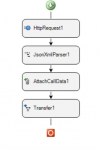
What i am trying to do now in CFD:

1. HTTP request to CRM (this part is working for now with the from number and called number)
2. JSON parser component with the data coming from CRM to save the data as variables (from number, called number, url)
3. Data attach to the call component? Here i don't know...
 

Attachments

  • Schermafbeelding 2023-10-12 175802.png
    Schermafbeelding 2023-10-12 175802.png
    21.3 KB · Views: 23
You need to attach 2 properties:
1) public_lookup_displayname_override > This is the contact name to show
2) public_crm_contact > This is the JSON of the CRM search result, which in your case you will need to build. The JSON format to build is the following:
JSON:
{
    "FirstName": "John",
    "LastName": "Doe",
    "Email": "[email protected]",
    "ContactUrl": "https://example.com/contacts/42013984654",
    "CompanyName": "",
    "PhotoUrl": null,
    "ContactType": 0,
    "PhoneBusiness": "+123456789",
    "PhoneBusiness2": null,
    "PhoneHome": null,
    "PhoneHome2": null,
    "PhoneMobile": "",
    "PhoneMobile2": null,
    "PhoneOther": null,
    "FaxBusiness": null,
    "FaxHome": null,
    "Pager": null,
    "ContactRawData": "42013984654|Contacts"
}
 
  • Like
Reactions: Evolute IT
Is this JSON the same as the one coming from the JSON parser component? Is all those JSON data required?
I only return this:

JSON:
{
    "FirstName": "John",
    "LastName": "Doe",
    "Email": "[email protected]",
    "ContactUrl": "https://example.com/contacts/42013984654",
    "PhoneBusiness": "+123456789",
    "ContactRawData": "42013984654|Contacts"
}

And what about the Response mappings variables fields?

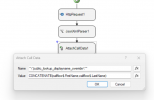
Data attach to the call component: How can i attach those 2 properties into the AttachCallData component?

1) public_lookup_displayname_override
2) public_crm_contact

I can set only set one Name and Value (see screenshot)...

And if this all set up correct, the last step i do is transfering the call to another number (CF).
Will all this data be included in the call so it can be seen in the WC/DA?
 

Attachments

  • Schermafbeelding 2023-10-13 145036.png
    Schermafbeelding 2023-10-13 145036.png
    50.5 KB · Views: 33
Last edited:
If your web service is returning that JSON, then you don't need to parse or manipulate it, you can just use that and attach it to the call. That information is enough, you don't need to provide all the fields.

You will need to use 2 Attach Call Data components, one for each property. So for the first you set the data name to "public_lookup_displayname_override" and the value to the contact name. And for the second you set the data name to "public_crm_contact" and the value to the JSON returned by your API.

Once you attach this data, you transfer the call to the queue, so your agents can receive the call. The contact name will be shown and the URL will be launched in a new browser tab.
 
  • Like
Reactions: Evolute IT
You will need to use 2 Attach Call Data components, one for each property. So for the first you set the data name to "public_lookup_displayname_override" and the value to the contact name. And for the second you set the data name to "public_crm_contact" and the value to the JSON returned by your API.

Hi,

"public_lookup_displayname_override"
Here we just have the "callflow$.FirstName" and "callflow$.LastName" as data in CONCATENATE strings?

"public_crm_contact"
Here we have the JSON returned from the webservice. But also CONCATENATE the data strings? Like we did before in the HTTP REQUEST? The same way?

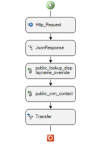
The flow should be like the screenshot?
 

Attachments

  • New screenshot.png
    New screenshot.png
    29 KB · Views: 23
Last edited:
Here we just have the "callflow$.FirstName" and "callflow$.LastName" as data in CONCATENATE strings?
Yes, correct. You could use:
CONCATENATE(callflow$.FirstName," ",callflow$.LastName)

Here we have the JSON returned from the webservice. But also CONCATENATE the data strings? Like we did before in the HTTP REQUEST? The same way?
This is up to you. If the web service returns the JSON exactly with the format required by 3CX, then you don't need to concatenate anything, just pass the returned data. But if what the web service returns needs to be manipulated in any way to build the JSON required by 3CX, then you will need to use CONCATENATE.

The flow should be like the screenshot?
Yes, something like that. But the most important details are in the properties you set, how you configure the components....
 
I am trying to test everything with my setup to see if everything is working fine.

"public_lookup_displayname_override": This part is working for now.

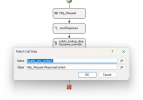
"public_crm_contact"
This is not working at all. No URL opens after the call.

See screenshot.for the settings
 

Attachments

  • New screenshot2.png
    New screenshot2.png
    58.5 KB · Views: 19
Last edited:
And what's the value that you're assigning there? What's the response from the web server? You can see this in the 3CXCallFlow.log file when you make the call and logs are in verbose mode.
 
And what's the value that you're assigning there? What's the response from the web server? You can see this in the 3CXCallFlow.log file when you make the call and logs are in verbose mode.

The web server response is:

JSON:
{"FirstName":"Anonymous3","LastName":"Anonymous4","Email":"[email protected]","ContactUrl":"https:\/\/trial.complystation.com\/app\/#Apps\/HROnboarding\/EntityDetail\/_CONTACT_DATA\/31156789\/_CONTACT_DATA","PhoneBusiness":"+32478067139","ContactRawData":"31156789|Contacts"}

I can see a link with href where you can click to follow the ContactURL but this page is not showing up automatic. You have to manual click on the link.

Is it also possible to add this as a contact in the phonebook of 3CX? What is the best way to do this?
And is it possible to see the FirstName and LastName coming from this JSON in the call logs in WC? Now i only see the DID.
 
Last edited:
I can see a link with href where you can click to follow the ContactURL but this page is not showing up automatic. You have to manual click on the link.
OK, then this means that the contact details are properly passed to the Web Client, you just need to configure the Web Client to automatically open this link when you answer the call. To do this, go to the Web Client > Settings > Integration, and select the option "Open Contact URL using Server Side CRM Integration".

Is it also possible to add this as a contact in the phonebook of 3CX? What is the best way to do this?
There is no component to create a contact from a CFD app.
 
Yes! The first issue is solved! The contact URL will now open automatically. Thanks!

Other issues:

Is it also possible to add this as a contact in the phonebook of 3CX? What is the best way to do this?
How can i do this if it is not possible to do this via the CFD app? Maybe a combination of CRM Wizard and CFD?

And is it possible to see the FirstName and LastName coming from this JSON in the call logs in WC/DA? Now i only see the DID.
How can i do this? Can we manipulate this data?
 
Last edited:
How can i do this if it is not possible to do this via the CFD app? Maybe a combination of CRM Wizard and CFD?
A CRM template can be configured to add the matched contact to 3CX, but you will not receive the DID in this case, only the caller's number.

How can i do this? Can we manipulate this data?
If you add the contact to the 3CX phonebook, it will be shown there.
 
  • Like
Reactions: Evolute IT
Status
Not open for further replies.

Latest Posts

Forum statistics

Threads
111,973
Messages
590,075
Members
164,895
Latest member
jasonkkrause