- Joined
- Oct 23, 2022
- Messages
- 20
- Reaction score
- 2


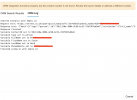
This actually depends on your configuration in Admin > System > Phonebook > Options. If you configure Exact Match there, then an exact match is expected. If you configure it to match the last 7 digits for example, then just matching the last 7 digits will be enough to get that record.We encountered this problem when developing our own CRM integration.
The number returned by the CRM must be strictly identical to the number sent by 3CX, otherwise it doesn't match.
If 3CX send E164, CRM must send E164.
If 3CX send a national format, the CRM must return a national format.
In your example, you send +447534414703 (the + is added by 3CX, as you may have set your XML this way, as can be seen in the "Request text").
However, your CRM returns "07534 414703": this doesn't match. You need to return the value "+447534414703".
Translated with www.DeepL.com/Translator (free version)
The problem with that is that it only passes those digits of the phone number in the URL to perform the API lookup and not the full number.This actually depends on your configuration in Admin > System > Phonebook > Options. If you configure Exact Match there, then an exact match is expected. If you configure it to match the last 7 digits for example, then just matching the last 7 digits will be enough to get that record.
So would a solution be to send a national format?We encountered this problem when developing our own CRM integration.
The number returned by the CRM must be strictly identical to the number sent by 3CX, otherwise it doesn't match.
If 3CX send E164, CRM must send E164.
If 3CX send a national format, the CRM must return a national format.
In your example, you send +447534414703 (the + is added by 3CX, as you may have set your XML this way, as can be seen in the "Request text").
However, your CRM returns "07534 414703": this doesn't match. You need to return the value "+447534414703".
Translated with www.DeepL.com/Translator (free version)
In this case you should run the lookup in the CRM using the last digits only. I mean, you should use a query with "number like XXXX" style, instead of checking for equal.....The problem with that is that it only passes those digits of the phone number in the URL to perform the API lookup and not the full number.

Founded in 2005, when VoIP was an emerging technology, 3CX has gone on to establish itself as a global leader in business communications.