Current 3CX ad hoc conference call for Windows app in computer

Status
Not open for further replies.

PeterCheng

Forum User
Joined
Jan 5, 2021
Messages
105
Reaction score
11
Hello sir,

We are testing Windows app in computer, and I found that the ad hoc conference call functions seems to have problem.
From mobile phone, if I'm talking to A, and want to join B, I can press conference key and then press B's number, the call will setup successfully.
If I use Windows app in computer, it won't work for me.
I need to call A first, then press line 2, and then press conference key to setup the call, it's not so straightforward!
And I see the post in 2017, many users complaint about it, and I don't know whether this feature will be back.
Thanks.

Peter
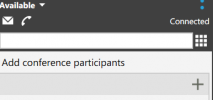
 
1612350601507.png
This function seems not to work right now.
If I type B's number and click +, and then press -> , it will fail to dial
 
Hey @PeterCheng

The way to create an ad-hoc conference from within the 3CX Phone for Windows is the following:

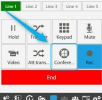
1. While on a call click on "Conference":
1612352588051.png

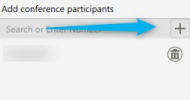
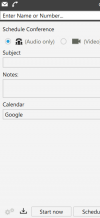
2. Then, add the number and click on the + sign:
1612352908992.png

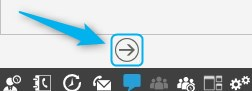
3. Then, click on the Arrow button underneath:
1612352975405.png

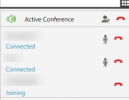
4. You and the person with whom you were on a call with should enter the Conference, and a call should be made to the second number entered. The second number should appear as "Joining" while ringing and then as "Connected" once they answer:
1612353032656.png


Are you following this procedure without the same results?

If yes, what do you mean exactly when you say "fails to dial". Do you get a specific error?

Are you able to make a direct call to that same number without trying to create a conference?
 
Hi Chris,

Yes, my steps are the same as yours.
But all my dialed numbers are external phone numbers, not the extensions in 3CX PBX.
And I can dial either numbers individually.
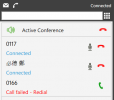
You can see the screen below that I dialed 0117 (0 is access code) and then press conference,
then press 0166 and press +, then press ->, then it will show the screen below.
1612360905381.png

Peter
 
Hi Chris,

3CX Version, 16.0.1078
Server OS, Windows Server 2019 Standard
Is the 3CX Server Hosted and where? on premise
IP Phone Make/Model/Firmware , 3CX Windows app
Provisioning Method: Local
Trunk Provider , SIP trunk to mg sip (NEC)
Has the Firewall Checker passed: YES

Are custom Phone Templates being used: NO

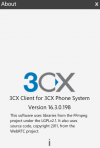
I use 3CX Windows app : 16.3.0.198
1612407624954.png
 
Hey @PeterCheng

Since, as you said, you can directly dial these same numbers (e.g 0166), but cannot add them to a conference call with the mentioned method, it may mean that this is related to the fact that, when creating a conference, the outgoing call to the external number is actually performed by the conference extension and not the extension that is creating the conference. That said, the conference extension, may not be allowed to make outbound calls if you have Extension or Extension Group restrictions on your Outbound Rules.

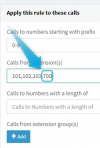
Access the Management Console and navigate to Outbound Rules, locate the Outbound Rule that is matched when making calls to numbers such as 0166 and check to see whether it has these type of restrictions, if it does, try adding the conference extension to the allowed extensions (700 if a 3 digit PBX, 7000 if 4 digit). It should look like something like this:
1612431191890.png


Apply the changes and try again.
 
  • Like
Reactions: PeterCheng
Hi Chris,

Thank you so much, it works.
Once I set the conference 7000 to the place you said, I can use normal way to set up a 3-way audio conference call.
May I know when the conference call will use "conference number" to dial out?
And do you have the plan to open the restrict of 3-way conference?
Because 4 - 5 way ad hoc conference meeting is normal to us.
We hope our users to use the Windows app as their softphone app,
so if user can easily make a 4-5 way conference call, it will be much welcome for 3CX system.
Thanks again.

Peter
 
Glad to hear that sorted it!

Well, the conference extension performs the call whenever you invite participants to the conference instead of calling them directly from your extension.

There's no official information regarding the max ad-hoc conference participants for the iOS and Android clients at the moment, but you might want to keep a lookout for future updates in our changelogs and in our blog where we post our roadmap.
 
Hi Chris,

Thanks a lot.
You mention that there's no official information regarding the max ad-hoc conference participants for the iOS and Android clients, how about the windows app in PC? the same? Because when the 3rd participant is planned to join, it will show the page like below. But if I use + to add 4-5 participants and then press -> , it works. All the participants can join into that conference call.
Why? It seems that you need to all the participants at one time, or you cannot add a new participant once the call has been setup. Any idea?
1612444570844.png
Peter
 
To have the conference extension automatically perform outgoing calls to the external numbers you have added as participants, you have to add them all at the beginning before the conference has started. If you want to add an additional participant after the conference has started, you will have to directly call that participant and then add him/her to the conference like so:

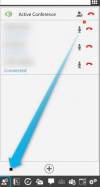
1. While in the Conference, click on the Presence button
1612445927484.png

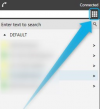
2. Click on the Dial Pad
1612445977835.png

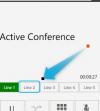
3. Click on Line 2 or another available Line.
1612446023637.png

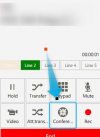
4. Make the call to the external number and when he/she answers, click on Conference
1612446113920.png


This participant should now also be placed in the same conference call.

If you want to add an internal extension to the already existing conference, you can just go to the Presence section, right click the extension and click on conference.

Note: The 3CX Phone for Windows does not have the same limitation regarding max number of ad-hoc conference participants as the Android and iOS clients.
 
  • Like
Reactions: PeterCheng
Hello Chris,

Thanks for your detailed explanation.
Just a small suggestion, maybe 3CX can consider the function in the future that just continues to press conference to add new participant.
It's more straightforward to me.

Peter
 
You're very welcome!

You might want to consider having a look at our ideas section to see if this has been recommended before. If it has, you can upvote the post.
 
  • Like
Reactions: PeterCheng
Status
Not open for further replies.