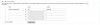
Custom BLF label on display phone (Yealink T46G)

Status
Not open for further replies.

jholcombe

Forum User
Joined
Jul 9, 2014
Messages
76
Reaction score
1
Is there a way, other than manually configuring each phone, to set the label on a custom BLF for a display phone? For example, I want to configure one of the BLFs on a Yealink T46G to pick up a call. I want it to show "Pick Up" on the display, not "*2". If this is not an option can a "Display Text" field be added in 3CX for custom BLFs for display phones? If the labels are manually set on the phone, it will forget the settings as soon as the phone is re-provisioned.

Thank you,

--John
 
The issue is that 3CX uses a generic screen interface (gui) to address the provisioning of all supported makes and model of phones. This allows the keys for a given make/model to be populated with various features which are then imported into a phone configuration via a standardized template for that make/model. It is my guess that there are simply too many variations and as a result it is somewhat problematic to develop a screen for each that would make use of all features for all makes/models.

As a result, you can manually provision the phone and then turn off the provisioning feature within the phone so that your settings do not get overwritten or, you can modify the template and use as a new template for that make/model (assumes that all will have the same settings) or modify the template for a custom "one-off" for each phone where the changes are desired.
 
It would be an additional variable for all of the "Display Phone" templates. An additional field for "Label". The template already has to put a label on the button. For now, in the case of a "Custom Speed Dial", it uses whatever value is in the "Action" field as the BLF button label. Couldn't 3CX send another value to the phone for "Label", if present? It would look a little cleaner and more presentable to the end-users. I've attached an example (you may have to scroll to the right in the picture window). I don't want to turn off re-provisioning because sometimes in the event of a firmware change, or change to the phone configuration in 3CX, the phone may need to be re-provisioned anyway. I'm hoping this might be something 3CX would consider adding in a future update.
 

Attachments

  • ExampleLabel.jpg
    ExampleLabel.jpg
    41.1 KB · Views: 439
3CX v14 supports this just fine. Upgrade to 14 and you can do it.
 
Status
Not open for further replies.