Custom CRM Integration: Contact Details and Custom_URL Issues

Status
Not open for further replies.

Sergio.P

Free User
Joined
Aug 9, 2023
Messages
9
Reaction score
2
Hello everyone,
I'm trying to integrate 3CX with my custom CRM. I created the template (only ContactLookup by Phone and Email), uploaded and activated from the Admin dashboard, I tested it and it works just fine, I'm able to retreive contact details and the mappings with 3CX fields are successful, but I have a few issues:

  1. If "Add CRM contacts to 3CX company phonebook when a call or message is sent or received" is not enabled, the contact details doesn't show up on the client app (windows)
  2. The ContactUrl doesn't show up, i tried several settings including the opening "on Ring" and "on Answer" from the client advanced settings/integration
  3. Furthermore I can't find any link or icon on the client app to open the contact url, wondering if it's there at all

With "Add CRM contacts to 3CX company phonebook when a call or message is sent or received" enabled the 3CX save the contact on the address book and I can see the details on the client app, but issues 2 and 3 are still present.

Is there anything you would suggest or am I missing something from Admin/client configuration?

Thank you,
Sergio
 
Are you calling from your mobile phone to make this test, and this number is configured as the mobile number for an extension?
 
Hi @edossantos and thank you for support!

To test it I called from two different mobile phones, none of which is
registered on 3CX. The lookup function then call the API endpoint from the CRM and it matches and maps the contact details succesfully.

Did I answer to your question? I can share the screenshots if needed.

Cheers,
Sergio
 
OK, first you need to confirm if the CRM integration is getting the contact details from the CRM. To do this, please enable verbose logs from the 3CX Console > Dashboard > Activity Log > Settings. Then make a test call where you reproduce the issue, and check the 3cxSystemService.log file that you can download from the 3CX Console > Dashboard > Activity Log > Logs button > Instance folder. In this file you will see the interactions between 3CX and the CRM, and the details of the matched contact, if any.
 
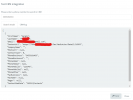
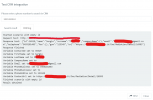
I enabled the verbose logging and tested it again. From the log file I can see that it finds and matches the contact, including the ContactUrl field. It also saves it to the address book if the save option is enabled.
 
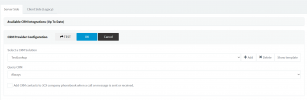
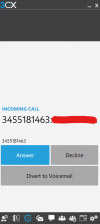
Are you using the Web Client or Desktop App for the extension that receives the call? Can you show a screenshot of what you see when you receive the call without adding the contact to the phonebook? Also, show us how you're configuring the Web Client / Desktop App > Settings > Integration.
 
I'm using the Desktop App, I also tried to change the App Settings (General/Advanced Settings/Integration) "Open contact" from "On Ring" to "On Answer" with no effect.

If I flag the option to store to contact on the address book, then the contact name is displayed instead of the number, but the contact Url doesn't open.

Attached the screenshots.
 

Attachments

  • Screenshot 2023-08-10 155707.png
    Screenshot 2023-08-10 155707.png
    51.6 KB · Views: 14
  • Screenshot 2023-08-10 155842.png
    Screenshot 2023-08-10 155842.png
    83.8 KB · Views: 13
  • Screenshot 2023-08-10 160032.png
    Screenshot 2023-08-10 160032.png
    115.3 KB · Views: 13
  • Screenshot 2023-08-10 160324.png
    Screenshot 2023-08-10 160324.png
    35.1 KB · Views: 13
I also tried to change the App Settings (General/Advanced Settings/Integration) "Open contact" from "On Ring" to "On Answer" with no effect.
This is not for CRM contacts. This works only when launching an URL that you manually enter.

Attached the screenshots.
This is the problem. You're using the old Windows legacy app, which doesn't support CRM integrations. You need to use the Web Client or the Desktop App.
 
  • Like
Reactions: Evolute IT
Thank you @edossantos for your reply.

As I understand by desktop app you mean the PWA correct? Because there's no native windows app rather than the legacy one.

If so, I'm unable to login to the webclient with the credentials I use to login to the Legacy app, therefore I can't install the PWA.

Do I need to enable my account to access the webapp?

Cheers,
Sergio
 
Thank you @edossantos for your reply.

As I understand by desktop app you mean the PWA correct? Because there's no native windows app rather than the legacy one.

If so, I'm unable to login to the webclient with the credentials I use to login to the Legacy app, therefore I can't install the PWA.

Do I need to enable my account to access the webapp?

Cheers,
Sergio
First, you need to login to the Web Client. Once you're in, ,you can use this web client, or you can download the Desktop App from the Apps section, and then provision it.
 
First, you need to login to the Web Client. Once you're in, ,you can use this web client, or you can download the Desktop App from the Apps section, and then provision it.

Thank you! I managed to login to the webclient and yes, the problem was the legacy Windows App. Everything works fine now!

I really appreciate your support.

Kr,
Sergio
 
  • Like
Reactions: edossantos
Status
Not open for further replies.