Custom CRM Integration OAuth Issues

Status
Not open for further replies.

BeeD

New User
Joined
Jun 9, 2022
Messages
6
Reaction score
0
I'm having trouble integrating my Custom CRM with 3CX using OAuth. I've generated an XML using the Template Generator but I'm getting an Invalid Request error.
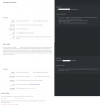
I've attached my CRM documentation, My XML and also the error generated.
Can someone please have a look and see what the solution might be.
 

Attachments

  • CRMDocumentation.png
    CRMDocumentation.png
    209.1 KB · Views: 33
  • Error.png
    Error.png
    64.2 KB · Views: 34
  • MyApp_OAuth.xml
    MyApp_OAuth.xml
    7.7 KB · Views: 13
You need to use the /oauth/authorize first to get a code, then use the token endpoint to get the access token from the authorization code.
 
You need to use the /oauth/authorize first to get a code, then use the token endpoint to get the access token from the authorization code.
Do I need to get the code separately (without using the XML)?
I've also tried doing that and then hard-coding the code into the XML however I still get the same issue and besides, the code is only temporary and as is the token (if not used for 2 weeks).
How can it all work from the XML without user intervention.
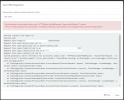
I've uploaded the attached XML, clicked "Authorize" after which I get taken to the CRM to authorise 3CX. After which it comes back to 3CX (to retrieve the given code) and then times out. When I click TEST, I see the message as in the attachment.
 
Do I need to get the code separately (without using the XML)?
I've also tried doing that and then hard-coding the code into the XML however I still get the same issue and besides, the code is only temporary and as is the token (if not used for 2 weeks).
How can it all work from the XML without user intervention.
I've uploaded the attached XML, clicked "Authorize" after which I get taken to the CRM to authorise 3CX. After which it comes back to 3CX (to retrieve the given code) and then times out. When I click TEST, I see the message as in the attachment.
The XML can do both. You would have the Parameter for OAuth then two scenarios, one of which is the code exchanger.

Look how the Salesforce or Zoho templates are made, they are great examples.
 
The XML can do both. You would have the Parameter for OAuth then two scenarios, one of which is the code exchanger.

Look how the Salesforce or Zoho templates are made, they are great examples.
Just tried using SalesForceV2 and Zoho as templates however same result. I'm missing something fundamental however cannot see what.
The below is the resulting error:
1654956394183.png

Any help appreciated.
 
Just tried using SalesForceV2 and Zoho as templates however same result. I'm missing something fundamental however cannot see what.
The below is the resulting error:
View attachment 30558

Any help appreciated.
Don't try to use them as template, that's not gonna work for sure. You need to inspire yourself from them to figure out how to properly configure OAuth.

If you are not used to work with things like that, partners can help you. We're one of those.
 
Don't try to use them as template, that's not gonna work for sure. You need to inspire yourself from them to figure out how to properly configure OAuth.

If you are not used to work with things like that, partners can help you. We're one of those.
I've figured that the code after Authorize isn't being saved. I've not understood the Refresh_token bit because the documentation doesn't state anything.
I thought it'd just be send authorize request, retrieve temp code, used to fetch access_token - which is then saved for a rolling 2 week period.
 
How do I manage to get the returned "code" during Auth to save when I click Authorize?
Plus for some reason I'm getting: Error occured: Value cannot be null. (Parameter 'key') on the redirect however I can see the code in the URL.
Any help appreciated.
 
Status
Not open for further replies.

Latest Posts

Forum statistics

Threads
112,278
Messages
591,653
Members
165,399
Latest member
NetworkActive