Custom CRM integration via JSON API - Everything works, but screen pop not initiated on inbound call.

Status
Not open for further replies.

tco

Customer
Joined
Sep 15, 2020
Messages
9
Reaction score
1
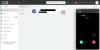
Everything is working properly and url is being stored. When I open contacts in web client I can click on the link and it will take me to the correct url. However this does not launch automatically the way it should. I've seen thread on rolodex, but that icon is not showing in extension either. I've also checked and popup is not being blocked. When I tested via a direct connection to DB it would auto pop record, but it was not popping correct url even though correct URL was attached to contact. Please see picture. Is this because of phone formatting or could it be issue with xml file?
 

Attachments

  • Screen Shot 2020-09-30 at 12.09.34 PM.png
    Screen Shot 2020-09-30 at 12.09.34 PM.png
    127.4 KB · Views: 23
What version of the PBX are you using? Update 6A has a fix for this.

You can clearly see that the Contact (rolodex) icon doesn't show. It should be in the popup.
 
  • Like
Reactions: edossantos
What version of the PBX are you using? Update 6A has a fix for this.

You can clearly see that the Contact (rolodex) icon doesn't show. It should be in the popup.

Here is version: 16.0.655

Is this correct?
 
I see that you're using the Chrome Extension. Can you confirm if the popup works with the Web Client? The issue you described is fixed in the version you have, so it should be working fine in the Web Client.
 
@edossantos I disabled the extension and called directly to web client. I did not receive a popup automatically upon the inbound call. The contact was added and when I navigate to contact tab and click crm button it takes me to the correct url.
 
Can you try accessing from a different browser (Chrome, Firefox, Edge) and see if that makes any change?
 
I ended up figuring out the problem. Contact options were set to match exactly for "Match Caller ID's to a contact entry", so formatting was throwing an error. I changed to match at least 10 digits and fixed the problem. Thank you
 
  • Like
Reactions: edossantos
Status
Not open for further replies.

Latest Posts

Forum statistics

Threads
112,324
Messages
591,897
Members
165,476
Latest member
awan05