Custom CRM Integration

Status
Not open for further replies.

Abdullah Elsaied

Joined
Mar 31, 2018
Messages
69
Reaction score
4
Hi Team,

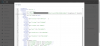
Kindly appreciate your help as I'm trying to integrate Custom CRM with 3CX, Issue I have is that the API sends the auth values in the header which can't be done using 3CX CRM Template Generator, I found this post https://www.3cx.com/community/threads/prosperworks-copper-crm-integration.58926/ which explain how to modify the XML file to add the headers but I have the same issue as the post the header added to XML file but after upload template and click show template can't find the headers as shown in below screenshots, is anyone has an idea about this issue.

3CX Version: 16.0.4.504 Screenshot (349).png
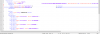
Screenshot (349).png

Screenshot (350).png
Thanks in advance
Regards
 
The value of your headers needs to be in square brackets? Like [somevalue]? In that case you should escape the bracket, otherwise they're interpreted as variables, and those variables will not be found, so you should use {{somevalue}}.
 
Hi Edossantos,

Many thanks for your replay but as you see in the screenshots the values of headers are between square brackets [ ] also I tried to put it between {{ }} and still have the same issue when upload it values disappeared Please correct me if I'm wrong.
Thanks

Screenshot (353).png
 
If you need to send the value with brackets [], then you need to use {{ and }} to escape the brackets, because those are special characters to denote variables. This is explained here:
https://www.3cx.com/docs/server-side-crm-template-xml-description/#h.2oikrv8ncny6

So, this is correct in your last screenshot.

Checking your template in more detail, I see that the problem is that you're adding these headers out of the Request element... Headers should be inside. You're doing this:
XML:
<Request bla bla bla />
<Headers>
   bla bla bla
</Headers>

And you should do this:
XML:
<Request bla bla bla >
  <Headers>
    bla bla bla
  </Headers>
</Request>
 
Hi Edossantos,


Many thanks for your great support it's working now :).

Best Regards
 
Hi Edossantos,

Sorry but I have another Issue with Call Journaling request It should be:
"https://site/api/contact/note/contactNote=Outbound&amp;contactID=[CONTACTID]"
it should get the CONTACTID variable from the get contact details but it gives error as attached but If I put the ContactID direct it's working
"https://site/api/contact/note/contactNote=Outbound&amp;contactID=888444" as I think my issue is to add the Variable value could you help me for the correct format for this value

Many thanks in advance
Regards
 

Attachments

You need to store the value of the CONTACTID to a variable, and then use the variable name in brackets. So, for example, in the lookup scenario you define your variable:
XML:
<Variable Name="ContactID" Path="CONTACTID"/>

Then in the Call Journaling scenario you refer to this variable as follows:
https://site/api/contact/note/contactNote=Outbound&amp;contactID=[Contact::ContactID]
 
Hi Edossantos,

Many thanks again for your great support it's working now :).

Best Regards
 
Status
Not open for further replies.

Latest Posts

Forum statistics

Threads
112,325
Messages
591,898
Members
165,478
Latest member
postmaster@studiolegaleda
